 The SSD Review The Worlds Dedicated SSD Education and Review Resource |
TSSDR TEST BENCH AND PROTOCOL
SSD testing at TSSDR differs slightly, depending on whether we are looking at consumer or enterprise storage media. For our SanDisk Optimus GX Pro 8100 Gen 5 8TB SSD testing today, our goal is to test in a system that has been as optimized through standard BIOS selections (ie. XMP 3)

For this Test Bench, there are no ‘bios’ specific performance tweaks whatsoever and the new ASUS Maximus Z790 Hero brought us to over 5.5GHz while the newest Crucial Pro Series DDR-5 memory rests comfortably at 6000MHz.
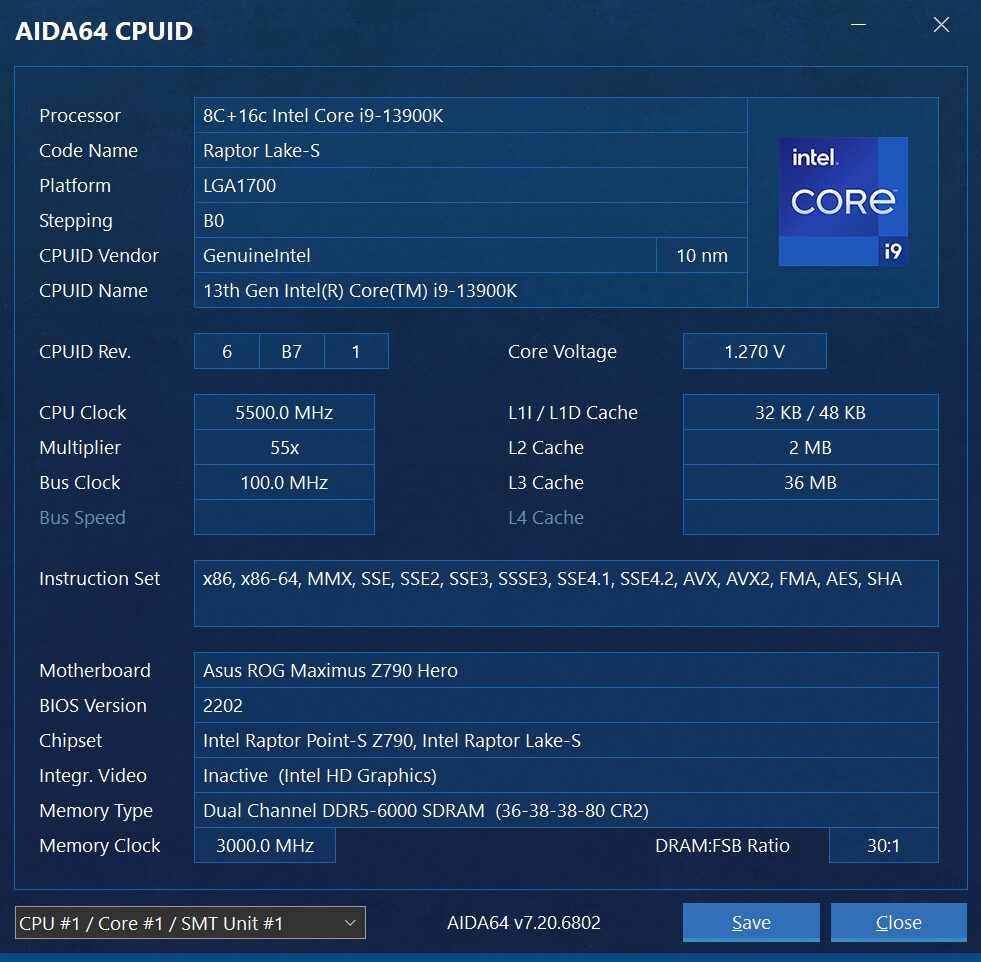
The components of this Test Bench are detailed below. All hardware is linked for purchase and product sales may be reached by a simple click on the individual item.
ASROCK Z790 TAICHI PCIE 5.0 TEST BENCH COMPONENTS
| PC CHASSIS: | Corsair 5000D RGB White Tempered Glass Chassis |
| MOTHERBOARD: | ASUS ROG Maximus Z790 Hero Gen 5 |
| CPU: | Intel 13th Gen Core i9-13900K |
| CPU COOLER: | Corsair Hydro Series H150i Capellix White |
| POWER SUPPLY: | Corsair HX1000i Platinum Modular 80Plus |
| GRAPHICS: | ZOTAC GeForce RTX 3080 Trinity White |
| MEMORY: | Crucial Pro Series DDR5-6000 4x16GB |
| STORAGE: | Sabrent Rocket 4 Plus Gen 4 4TB NVMe SSD |
| KEYBOARD: | Corsair K70 PRO RGB Optical Mechanical Gaming |
| MOUSE: | Corsair M65 RGB Elite FPS Gaming |
| MONITOR: | Samsung 34? 1440p WQHD Ultrawide Gaming |
BENCHMARK SOFTWARE
The software in use for today’s analysis is typical of many of our reviews and consists of Crystal Disk Info, ATTO Disk Benchmark, Crystal Disk Mark, AS SSD, Anvil’s Storage Utilities, AJA, TxBench, PCMark 10, 3DMark, PassMark Performance Test, Final Fantasy XIV Gaming BenchMark, as well as true data testing. Our selection of software allows each to build on the last and to provide validation to results already obtained.
A WORD ABOUT PERFORMANCE AND BUILDS
We have updated to our latest Ultra 200 Series Z890 Test Bench, however, we are finding that performance is best from our Z790 Test Bench in use for this report. Our goal is to inform our readers of the best performance possible from SSDs. Having said that, SSD performance can be a toss up when deciding on which CPU to test with. AMD CPU’s will give you the best high sequential performance, whereas Intel CPUs will provide the best low random performance. WE have favoured Intel benches for some time and this report is with an Intel test Bench.
Upgrading Test benches every two years on average may also cause a performance increase in testing which we will identify in our comparison charts until there are enough Gen 5 reviews to move them to their own chart. Our view is simply that we want to provide the reader with the best possible performance and we welcome all to refer back to specific reports in order to identify the system in use should they desire. Logically, we simply haven’t the time to retest hundreds of SSDs every time we move up to a new platform. Thank you for understanding.
CRYSTAL DISK INFO VER. 8.17.7 X64
Crystal Disk Info is a great tool for displaying the characteristics and health of storage devices. It displays everything from temperatures, the number of hours the device has been powered, and even to the extent of informing you of the firmware of the device.
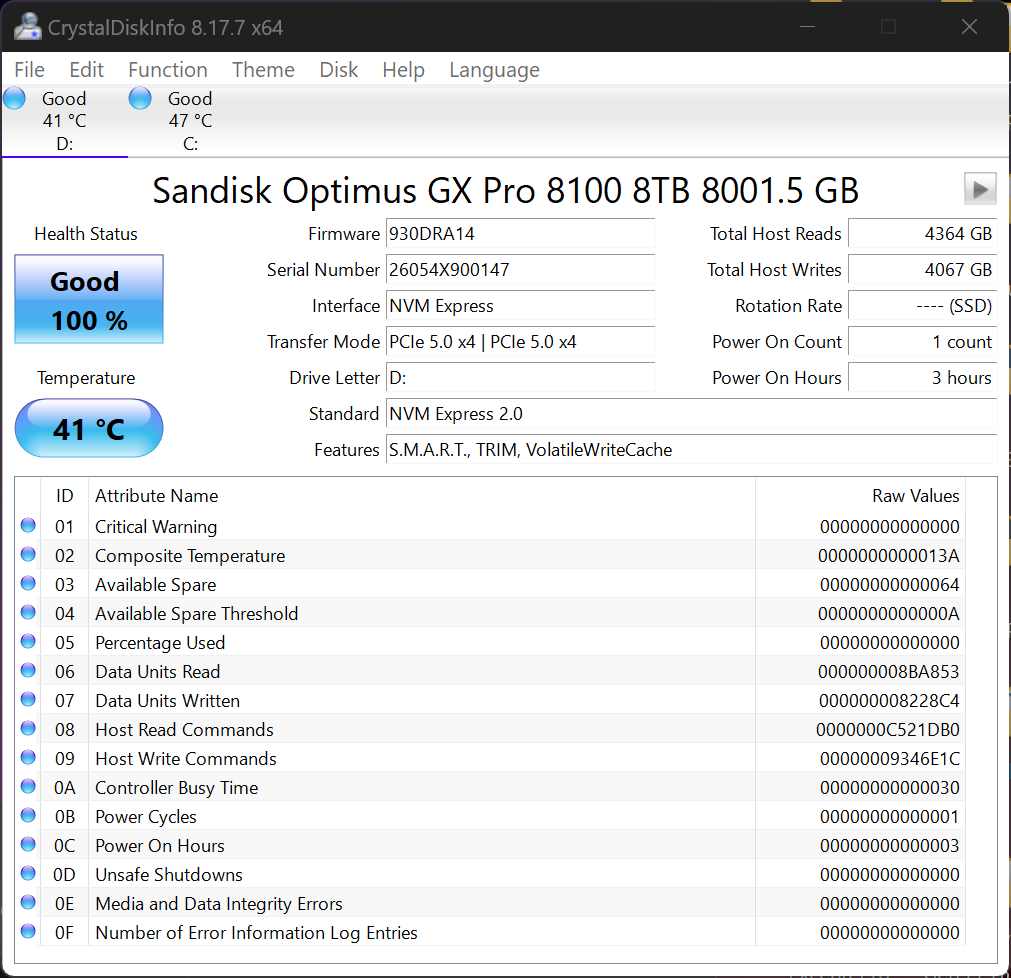
Crystal DiskInfo validates that our SSD is running in PCIe 5.0 x4, using the NVMe 2.0 protocol and confirms that it is TRIM capable. This SSD is probably one of the coolest in our system yet.
ATTO Disk Benchmark is perhaps one of the oldest benchmarks going and is definitely the main staple for manufacturer performance specifications. ATTO uses RAW or compressible data and, for our benchmarks, we use a set length of 256mb and test both the read and write performance of various transfer sizes ranging from 0.5 to 8192kb. Manufacturers prefer this method of testing as it deals with raw (compressible) data rather than random (includes incompressible data) which, although more realistic, results in lower performance results.
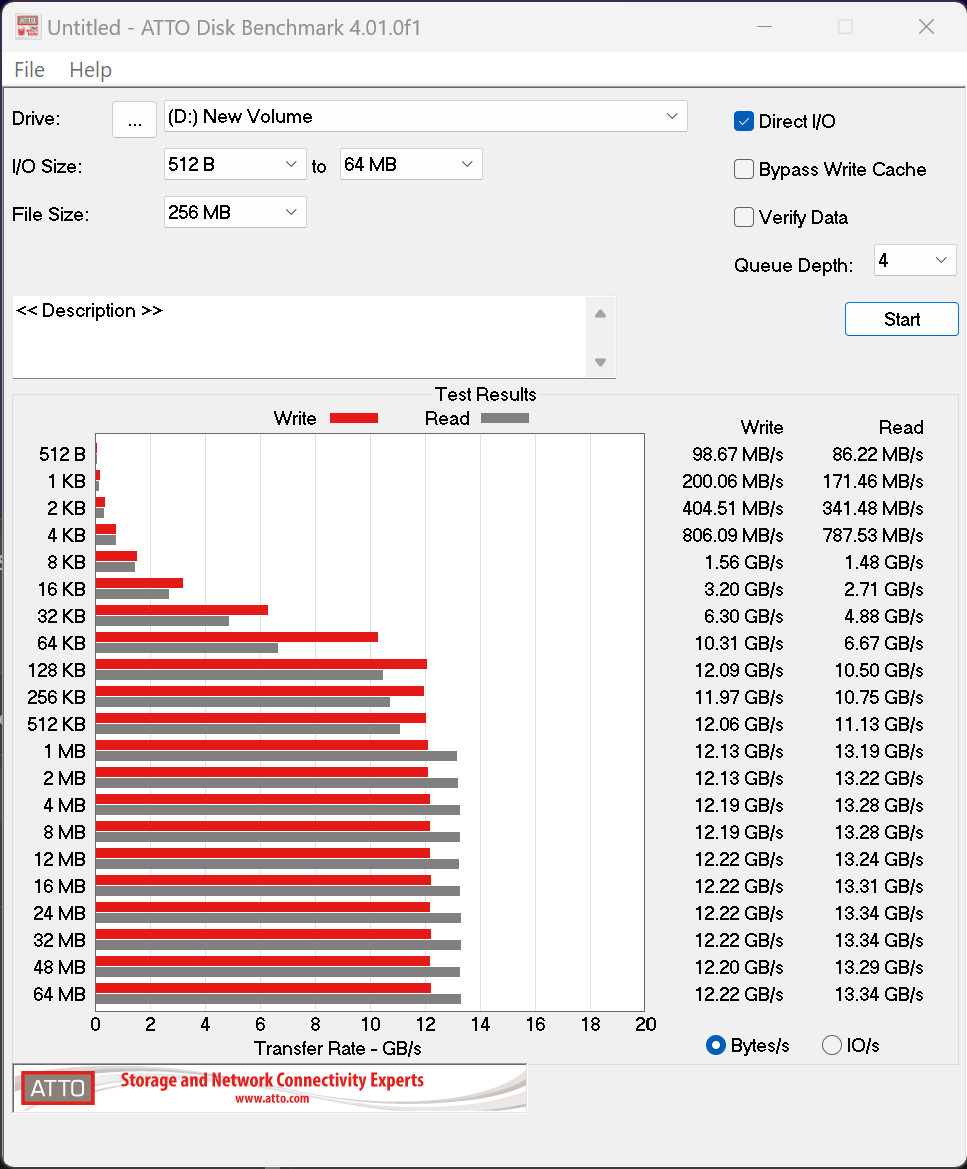
ATTO performance hits highs of 13.34GB/s read and 12.22GB/s write are excellent results for this SSD.
Impressive review of a powerful Gen5 SSD with massive capacity and speed. Do you think 8TB NVMe drives will become more affordable enough for everyday users in the future?
NAND is a cyclical market. We are in a boom, but that boom– and it’s associated high pricing, is showing cracks. Demand will diminish and pricing will return to normal. I bought the sn850x 4TB for $226 USD last year, that might never be the case again, but $379 seems like a reasonable price floor , instead of the current price of $599
The memory and storage crisis will not happen for too long. Once the AI bubble bursts (hopefully by 2028), prices for these will basically crash down back to normal prices or even be cheaper then how they were in 2024.
Same with the GPU crisis during 2021, people thought that this will happen for a long time, but then during mid-2022, prices for GPUs unexpectedly crashed down as well.
Need to tell you something important about this Txbench. Although you said to simply click on its title for a “free copy”, when I clicked on it, this website appears not to work anymore or maybe it is the wrong link. In fact a couple times when I tried, this website even redirected me to a tech support scam and scareware link where I got a false warning that my “Windows system is damaged”, and that I had to call a fake phone number to fix it. It even wanted to download some files. I completely blocked it though and pressed Alt + F4, but other users who might not know many think their system got infected. Because of this, may you please fix the link, or maybe upload a copy of Txbench somewhere else, as Txbench is very useful for even secure erasing SSDs and viewing detailed SMART information status. I could not find any other benchmark utility that could do what Txbench does. Even if you can not though, please still remove the clickable link for Txbench as this website might mislead others to a false scareware website. Thank you so much!
Thank you for your input!