 The SSD Review The Worlds Dedicated SSD Education and Review Resource |

CRYSTAL DISK BENCHMARK VER. 8.0.4 x64
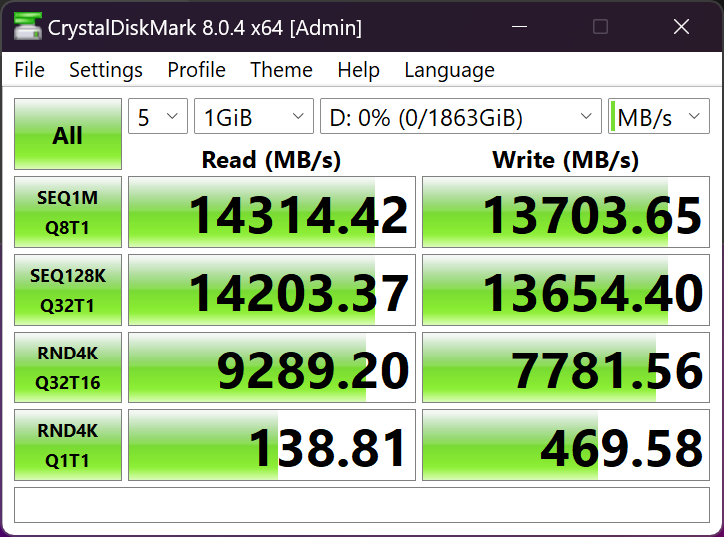
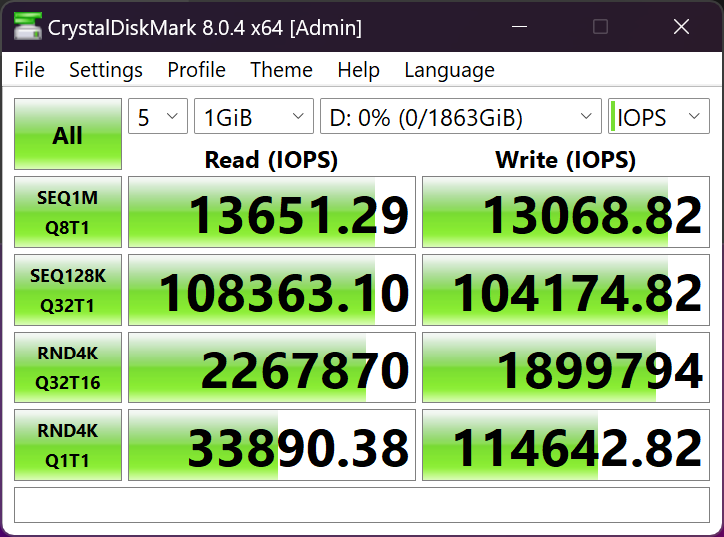
Crystal Disk Benchmark is used to measure read and write performance through sampling of random data which is, for the most part, incompressible. Performance is virtually identical, regardless of data sample so we have included only that using random data samples.
THROUGHPUT
IOPS
TESTED WITH ULTRA 7 TEST BENCH
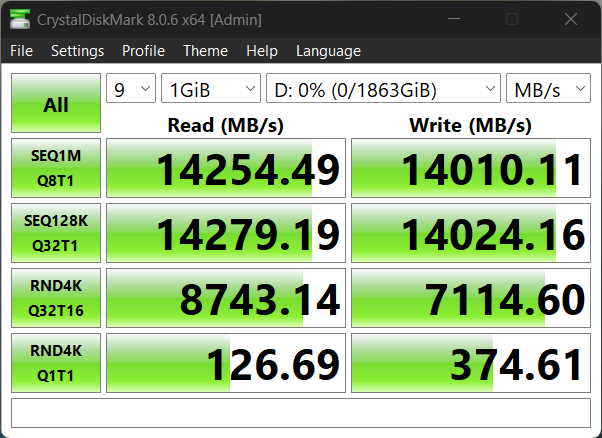
The first results were obtained with our Z790 Test Bench while this last one is with our latest Ultra 700 Test Bench. All of these are the best we have ever obtained, however, we wanted to include the Ultra series result as it is the only time we have ever had an SSD reach 14GB/s read and write. The difference between the two Test Benches is that the newer Ultra Series test Bench provides superior high sequesntial read and write results while the Z790 provides better low random 4K results, which we feel are the more important results to highlight.
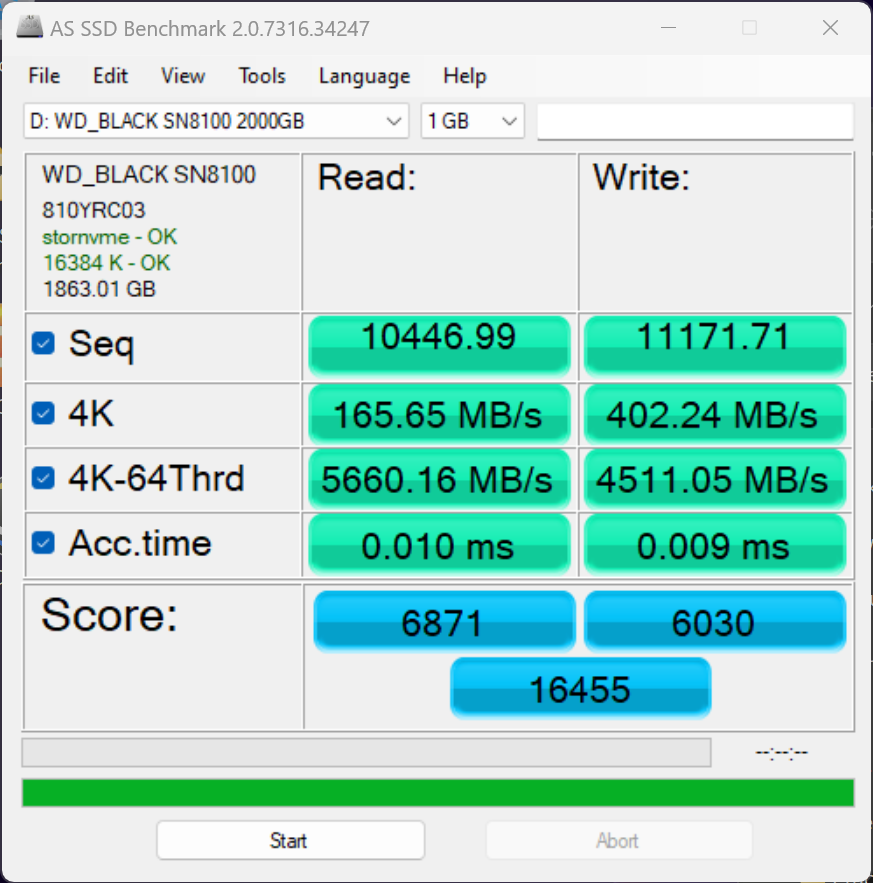
The toughest benchmark available for solid state drives is AS SSD as it relies solely on incompressible data samples when testing performance. For the most part, AS SSD tests can be considered the ‘worst case scenario’ in obtaining data transfer speeds and many enthusiasts like AS SSD for their needs.
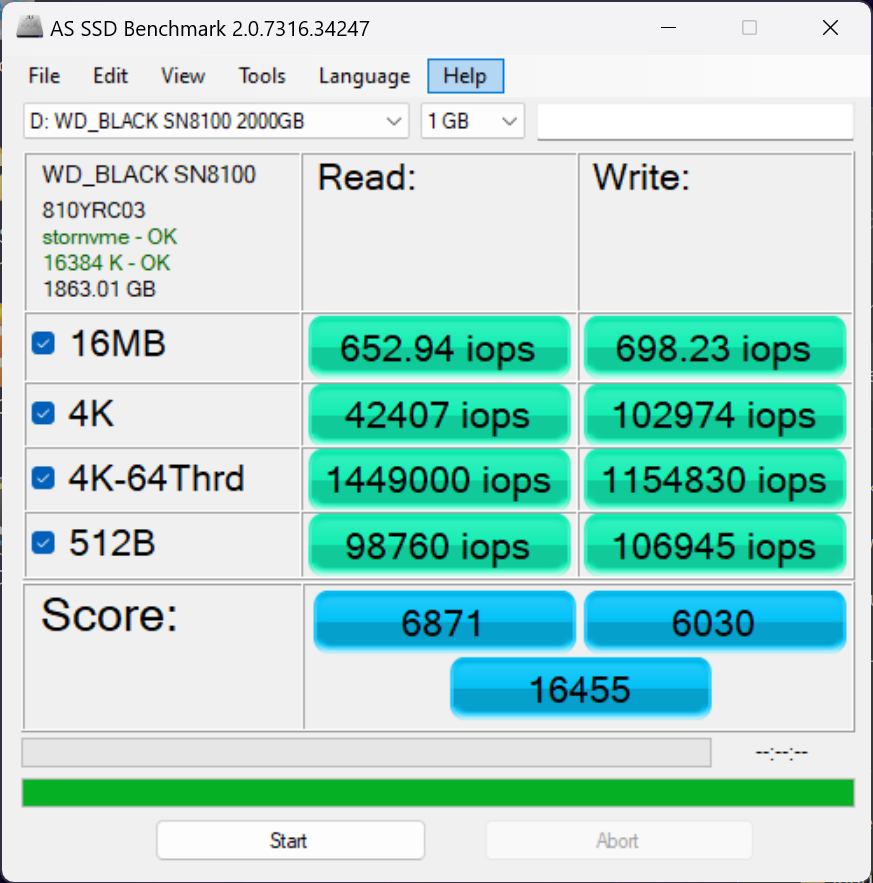
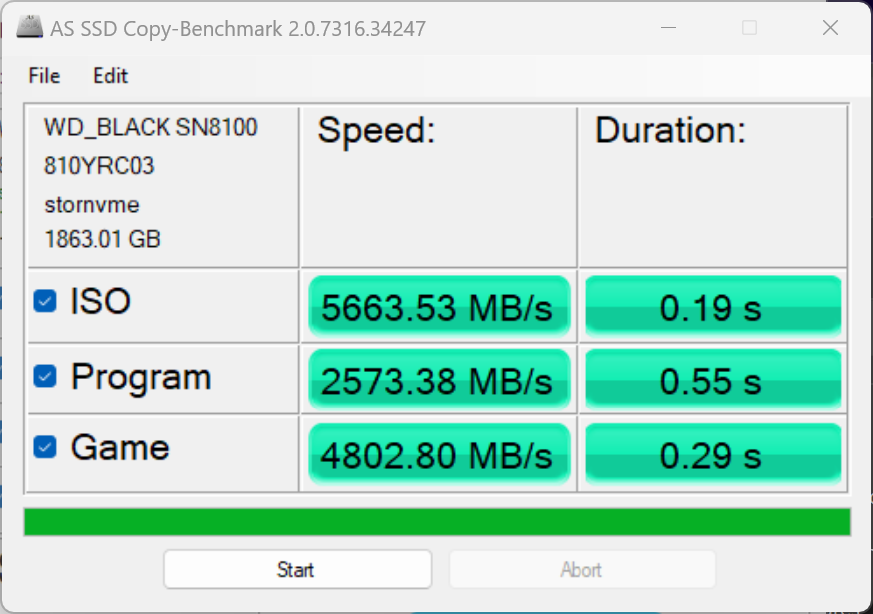
ANVIL STORAGE UTILITIES PROFESSIONAL
Anvil’s Storage Utilities (ASU) are the most complete test bed available for the solid state drive today. The benchmark displays test results for, not only throughput but also, IOPS and Disk Access Times. Not only does it have a preset SSD benchmark, but also, it has included such things as endurance testing and threaded I/O read, write and mixed tests, all of which are very simple to understand and use in our benchmark testing.
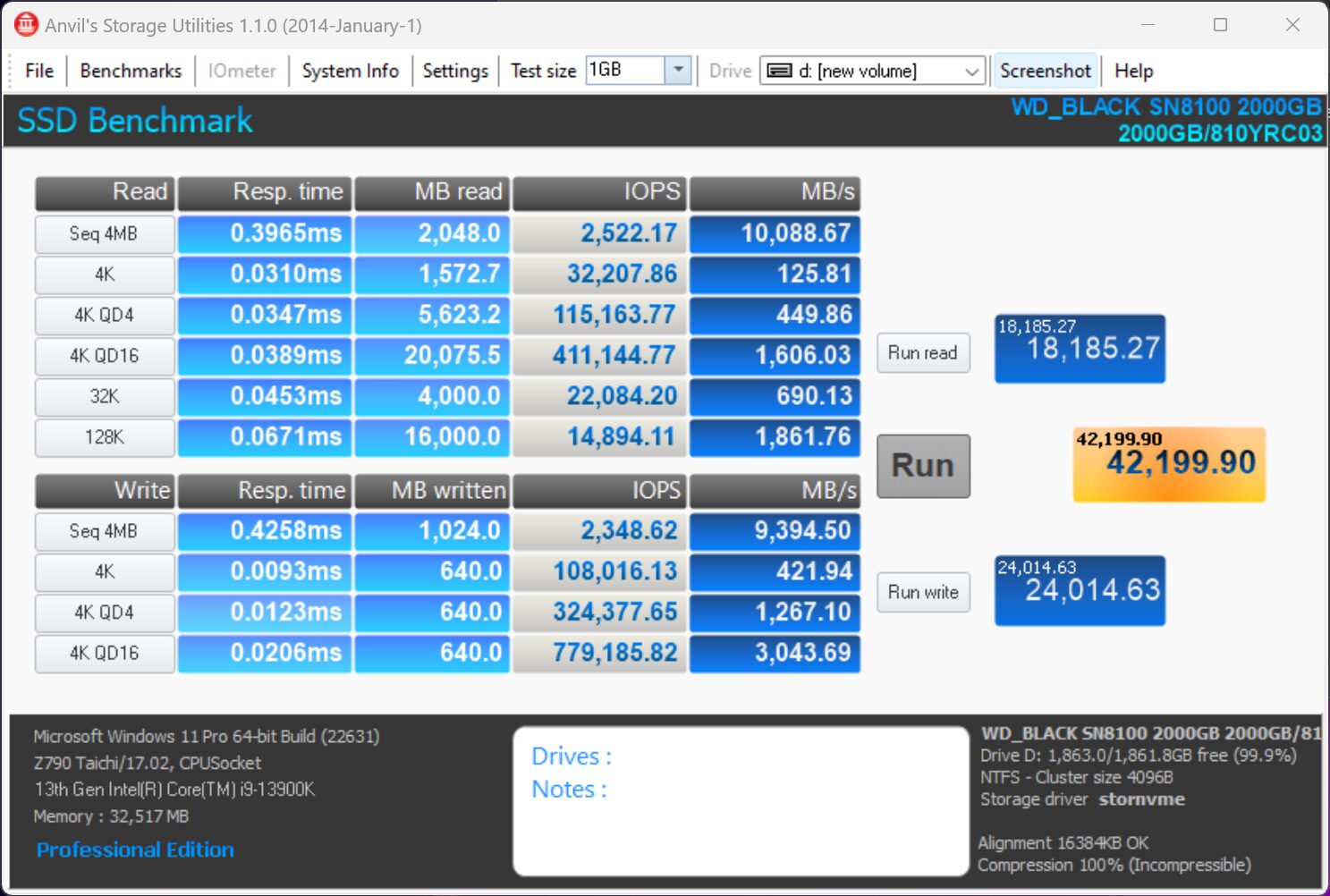
AJA VIDEO SYSTEM DISK TEST
The AJA Video Systems Disk Test is relatively new to our testing and tests the transfer speed of video files with different resolutions and Codec.
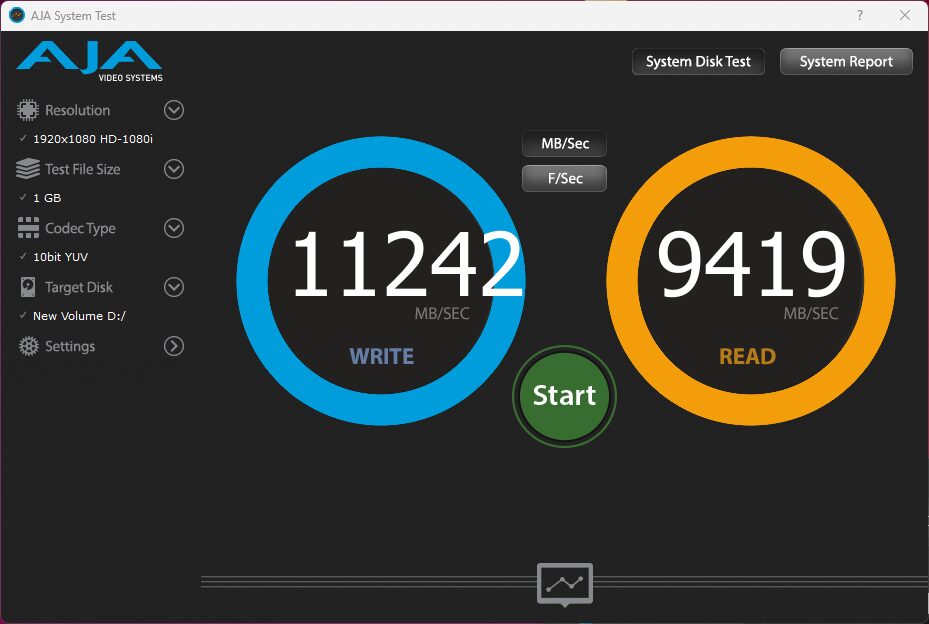
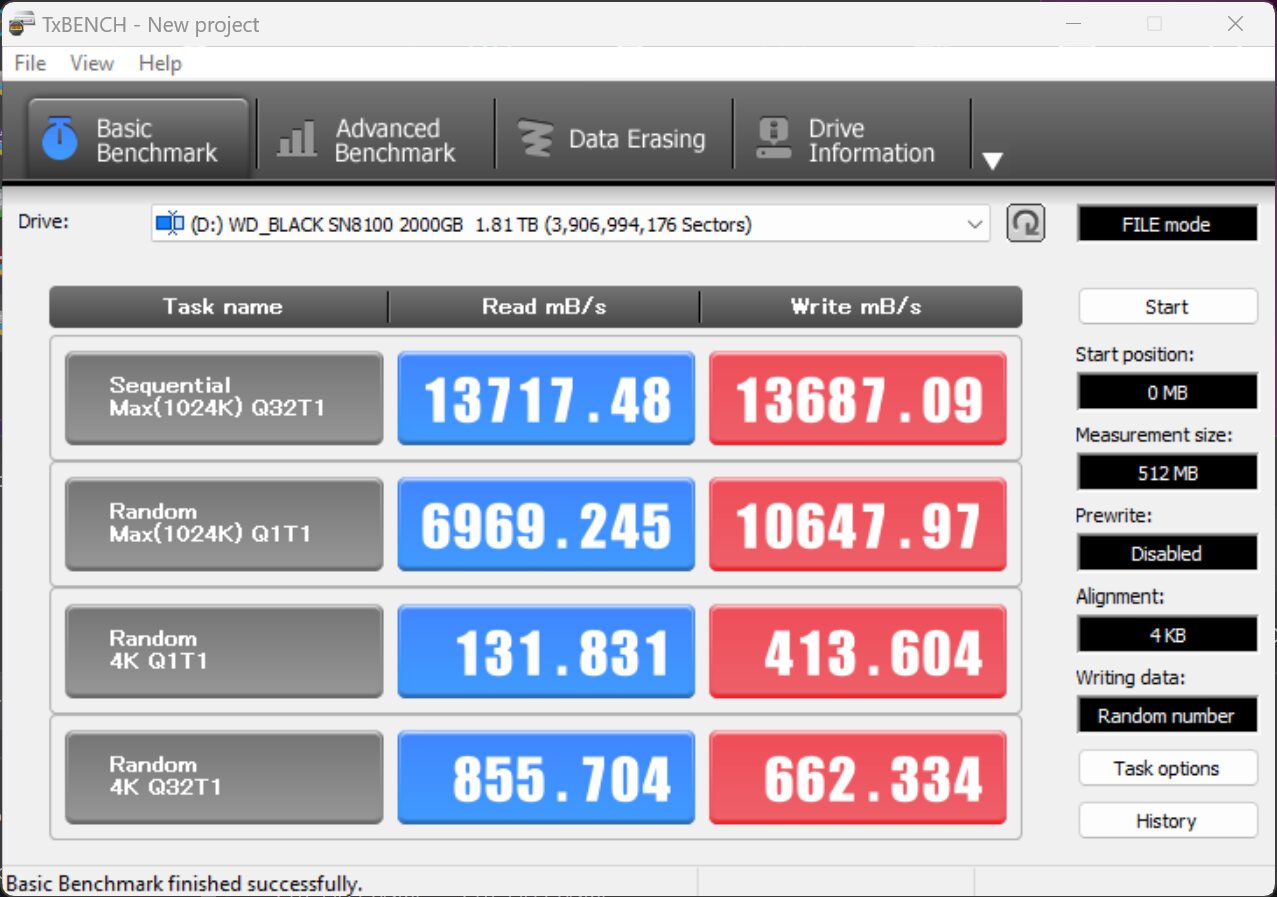
TxBench is one of our newly discovered benchmarks that we works much the same as Crystal DiskMark, but with several other features. Advanced load benchmarking can be configured, as well as full drive information and data erasing via secure erase, enhanced secure erase, TRIM and overwriting. Simply click on the title for a free copy.
Would really like to see the Intel Optane 5800x on the charts for real world data testing. Would also like to see the steady state 4K Q1T1 tests on both the Optane and the 8100 side by side.
Optane’s strength likes in low queue depth consistency from what I’ve seen, since there is no cache blowout happening like on modern SSDs. Any chance of this being an Optane killer on things like a 70% full drive?
I was never able to obtain an Optane 5800x, but my 905 is still my OS drive for the low latency program launching. I use a 4TB NVMe 4.0 SSD for bulk storage. I would love to find a solution that didn’t require me to run an m.2 -> u.2 adapter for my OS drive, but so far the low latency + program launch time “feel” of the Optane wins vs. any SSD I’ve tried yet.
As described in our article, the two SSDs serve different purposes, the first being consumer related tasks while the second is data center. For this reason, we don’t provide steady state results or comparisons in our reports, unless they are specifically directed as being an enterprise report. Thanks for writing!
James is right, the Optane 5800X should have been compared. Prosumers don’t care what the drive was “intended” for. Pricing has come down enough that I’m considering an array of P5800X vs. SN8100’s and it would have been nice to quantify the performance difference at low queue-depths, as well as both sequential and random performance once the SN8100’s cache has been saturated.
Even though comparison may not be that relevant, steady state results are the most important, because those are real 95% – 99% of the time SSD speeds.
Lots of people, most probably majority, don’t use SSDs like RAM: write and then read/modify what was just written. I mean lots of things are written once and then only read for months and years: like OS, apps and so on. Still the reviewers show only that insanely high 4K RND QD1T1 read speeds, which for this disk are between 120 – 140 MB/s. But after all, there will be no that low latencies you are mentioning. And this is you who started to compare this drive with Optane, in your review, which doesn’t make sense, because you are comparing numbers for 1% – 5% scenarios. Most of the people will see that only in CDM and still some believe that this how fast their drive really works. You are comparing this drive like it is an SLC drive (you are comparing those latencies), while it is not. It is a TLC drive with seriously lower real speeds and this is you who misleading non-tech people after all.
I don’t know the real reason, why you choose not to mention that most of current top SSDs have about 60 MB/s of 4K RND QD1T1 read speeds, when they are new (it may or will degrade as well eventually). And that nothing has changed for years. Most probably, if we are talking about consumer drives, Samsung 970 Pro (which is what, 8 years drive?) is still not beaten, and TLC drives for number of years are showing nearly the same top speed. Sometimes, actually, the next new generation shows lower speeds. I have seen numbers when a “new king” in steady random reads dropped to 45 MB/s (25% drop) comparing to previous top if we are talking about steady random reads. Most probably because something went wrong with the new gen “+100500 layers” NAND, which is very hard to read fast after all. But in SLC scenarios, inside a buffer — it’s a king.
I agree with much of what you are saying. Looking for a place to write? You have a great understanding and your first hand experience also seems to be great. With respect to our reports, you can easily see that we have consumer as well as enterprise SSD reports, enterprise tackling steady state from every angle. We don’t do this with consumer SSDs as it is not the information most are looking for first and foremost. Plenty of websites have gone through this exact same thing and I am not sure if any are still testing steady state for consumer level SSDs, at least current ones. Thanks for writing and if ever you are looking for an outlet to continue, we might be interested!
Here’s a side-by-side of the SN8100 vs Optane P5800X. The tests were done by different individuals on different systems, but at least provide a sense of comparative performnace: https://abulhassan.com/wd-black-sn8100-2tb-vs-intel-optane-p5800x-nvme-ssd/
Absolutely love this level of dedication — nothing says “storage geek” like testing SSDs at 4:30am right after a transpacific flight! Those Gen5 drives hitting 14GB/s are wild, especially seeing a DRAMless model push that performance barrier. Curious to see how thermal throttling is handled under sustained loads.
We recently benchmarked some enterprise-grade Dell SAS SSDs in a G14-series rack — obviously not Gen5, but still rock-solid for mixed-use environments where endurance and hot-swap reliability matter more than raw speed. Totally different use case, but fun to compare evolution across form factors.
Keep pushing the envelope — and enjoy that jet lag.
I hope you get as much sleep as you need because I’m hoping for a test of the new Crucial T710 that was announced at Computex as soon at its available. It will make for an interesting 3 way shootout between the WD 8100, Samsung 9100 and Crucial 710 when all 3 are readily available, hopefully all with their own heat sinks. Sleep well!
The SN8100 will be tough to beat. It is an amazing SSD. We have received the order confirmation for the T710 from Micron so hopefully sooner than later.
It would be great to see a Samsung 9100 Pro test against the Z790 now to have a real comparison.
Thanks for your interesting articles. How to download TxBench? The https://www.texim.jp/txbenchus.html link is broken.
Fixed . Enjoy.
Thanks for the quick reply, but I cannot access
https://www.texim.jp/txbenchus.html
The web browser Safari 18.5 (18621.2.5.18.1, 18621) on macOS 13.7.6 (22H625) Ventura on Mac (Intel) says:
Safari Can’t Find the Server
Safari can’t open the page “https://www.texim.jp/txbenchus.html” because Safari can’t find the server “www.texim.jp”
How to download TxBench? I think it is for Windows (not for Mac) but I would like to download it anyway. Thanks again for all.
Yes. I understand. If you click on the title, the referring link has been changed.
Thanks. Which title? What is the working link?
Great review! As I understand it, Dashboard application is not discontinued but just changed from Western Digital to SanDisk one. The new version is available on SanDisk website and not on Western Digital, here: https://support-en.sandisk.com/app/answers/detailweb/a_id/31759
Thanks for that.
i bought a 2tb hoping it would downgrade to PCI-e 4.0 x4, nope, unfortunately my system decided to downgrade it to 1.0 x1, had to return it. even though my amd 7945hx supports pci-e 5.0 on a technical level, it only supports nvme pci-e up to 4.0. its too bad that it couldnt just downgrade. ended up buying a different 4.0 x4 nvme. believe me, i gave it all the testing and checking before giving up. it was already apparent to me when it required 2-5 minutes to post bios each time that it wasnt going to get past this issue.
I checked extensiively and you seem to be the only instance of this issue. Sorry but I have no suggestions except maybe a fresh install.
Amazing performance in the review. I purchased a 2 GB and 4 GB to run in my setup, and performance is significantly lower. My SEQ1M score is very high (14956 Read / 14169 Write). However, SEQ12K drops to 9300 Read / 11,071 Write. RND4K drops substantially lower compared to review, at 1070 Read and 923 Write. My 3DMark SSD Storage score is also only 5,100 at best. This is on a 9950X3D system with MSI X870E Tomahawk motherboard. Appreciate any suggestions on troubleshooting.
check your heat, i had the same issue , installed 3rd party heat sink (thermalrite HR-10 pro) and no more throttling during benchmarks