 The SSD Review The Worlds Dedicated SSD Education and Review Resource |
PCMARK 10 FULL SYSTEM STORAGE BENCHMARK
PCMark 10 Storage Benchmarks produce an overall score as a measure of drive performance. Comparing devices is as simple as comparing scores. The tests also measure and report the bandwidth and average access time performance for the drive. Each test uses traces recorded while performing real-world tasks such as booting Windows 10, starting applications such as Adobe Photoshop and Illustrator, working with applications such as Microsoft Excel and PowerPoint, and copying several large files and many small files.
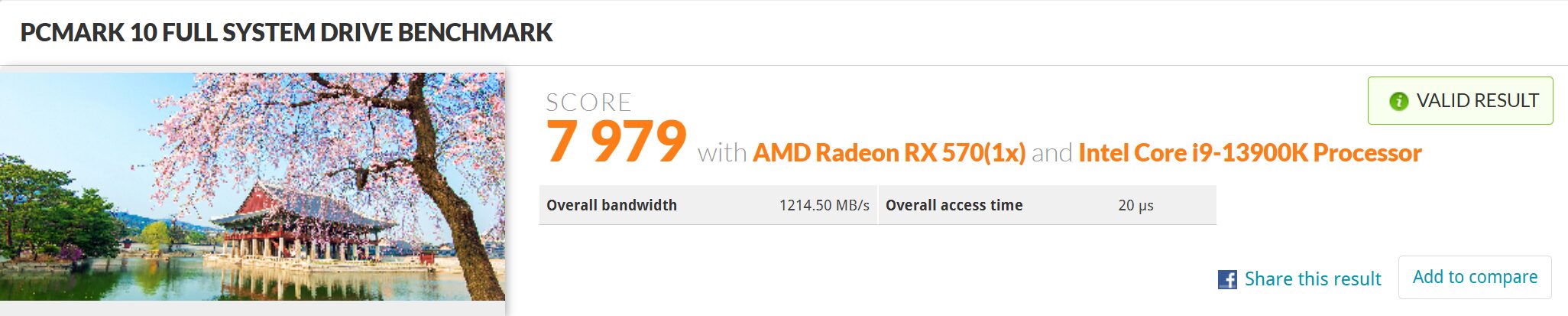
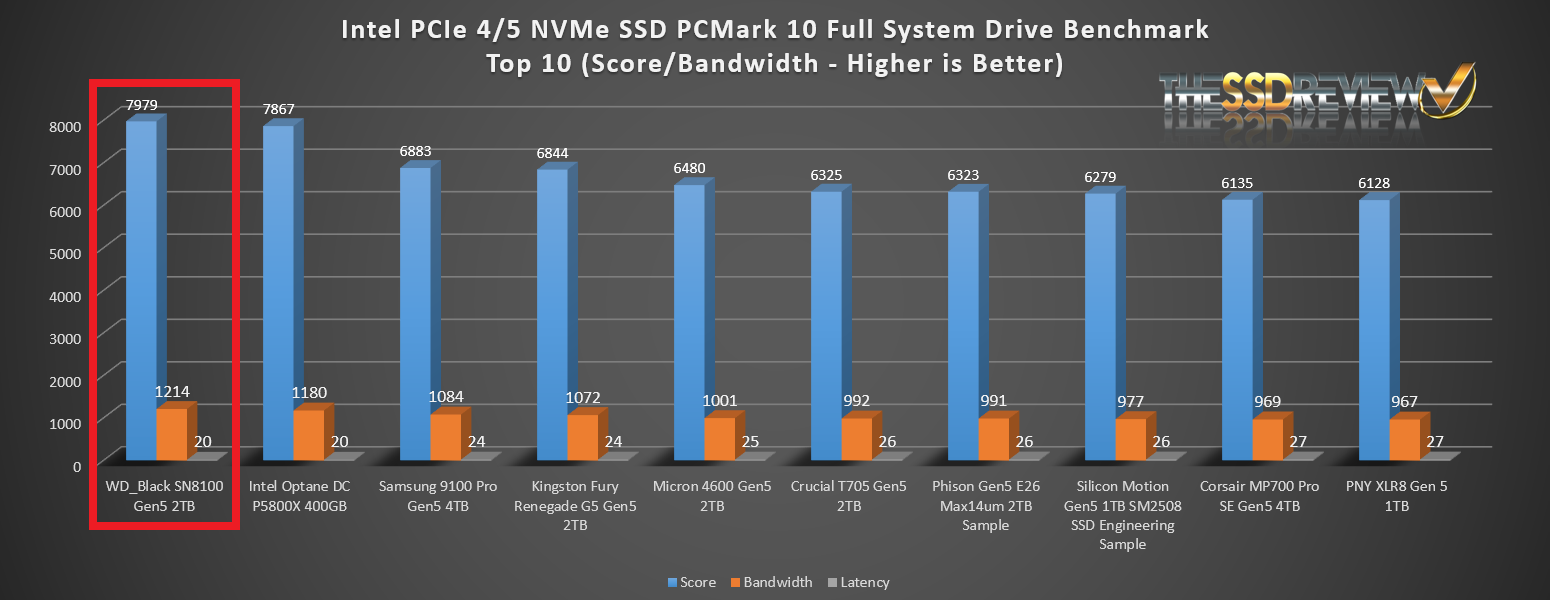
The WD_Black SN8100 Gen5 SSD achieved the top score we have ever received with PCMark 10 Full System Storage, even bettering the Intel Optane DC P5800x.
PCMARK 10 QUICK SYSTEM STORAGE BENCHMARK
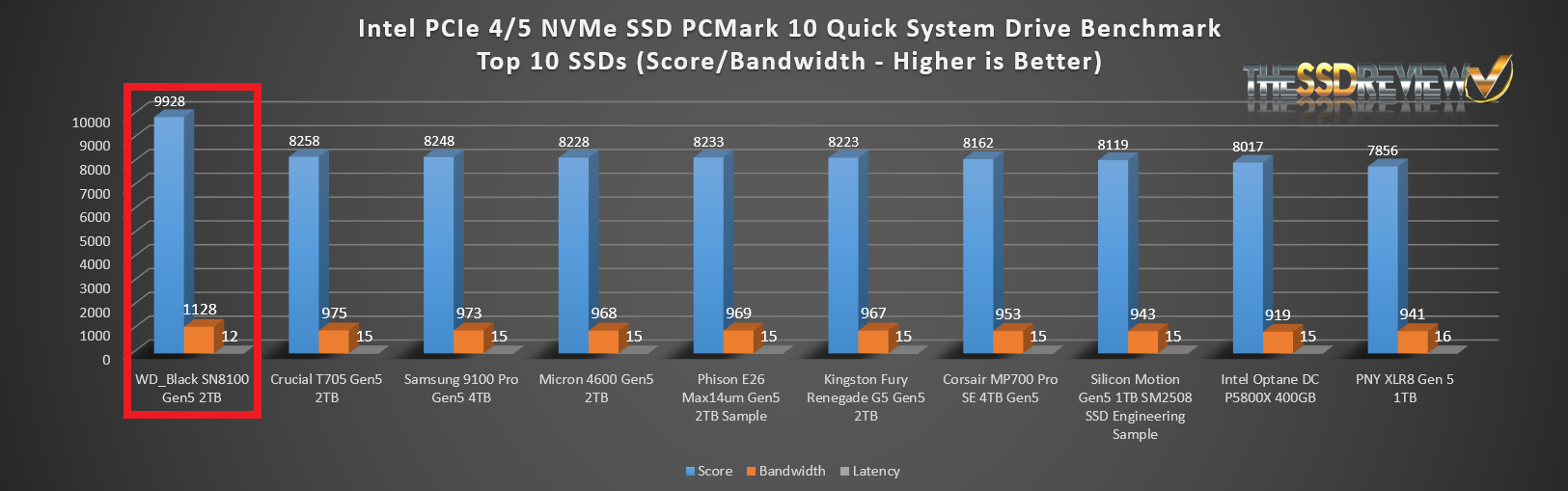
The Quick System Drive Benchmark is a subset of the Full test and is more representative of typical daily usage to show what would be expected regarding hybrid SSD performance on a day-to-day basis.
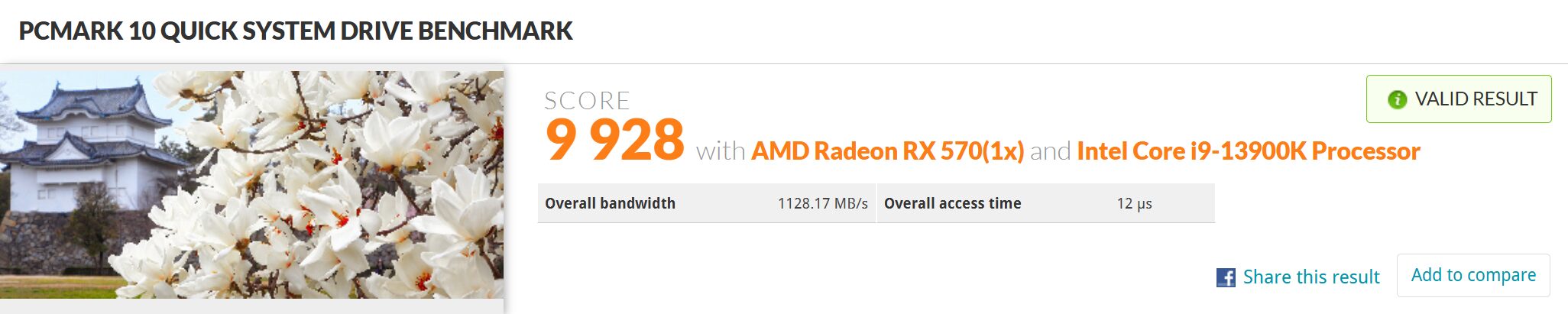
Again, the WD_Black SN8100 Gen5 SSD in our top SSD in this Bench (and every other we threw at it).
TRUE DATA TESTING
For our True Data Testing, we simply loaded 15GB video, music, photo and OS files onto the WD_Black SN8100 Gen5 SSD and copied the data to a new folder on that same disk.
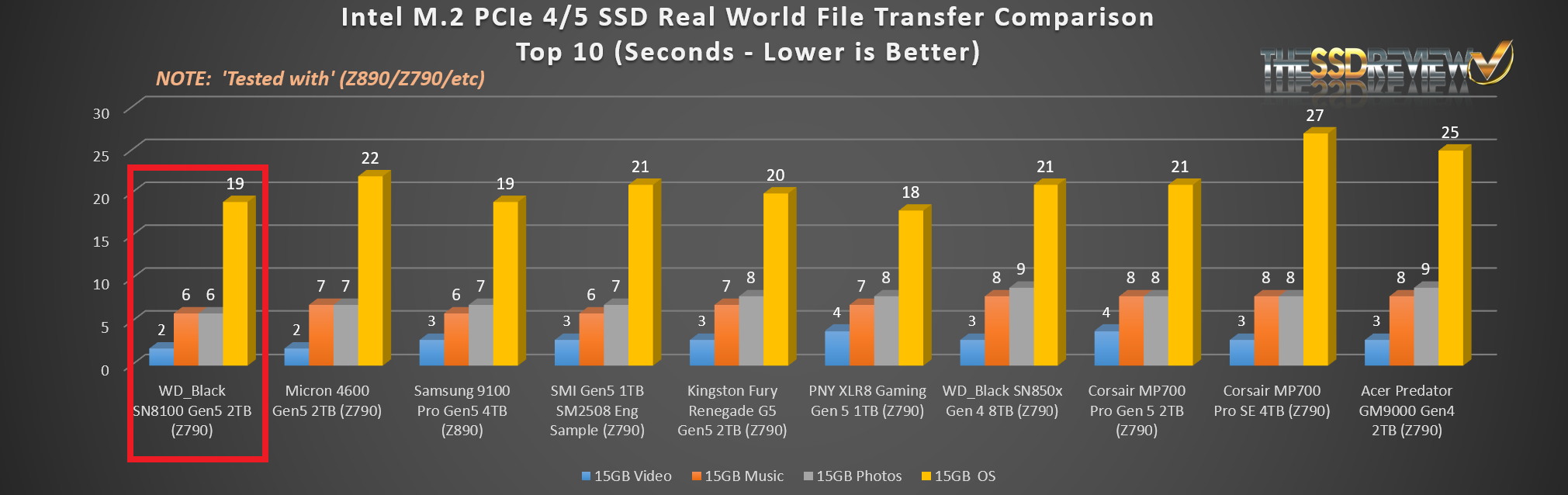
The SN8100 topped this category as as expected.
PASSMARK PERFORMANCE TEST
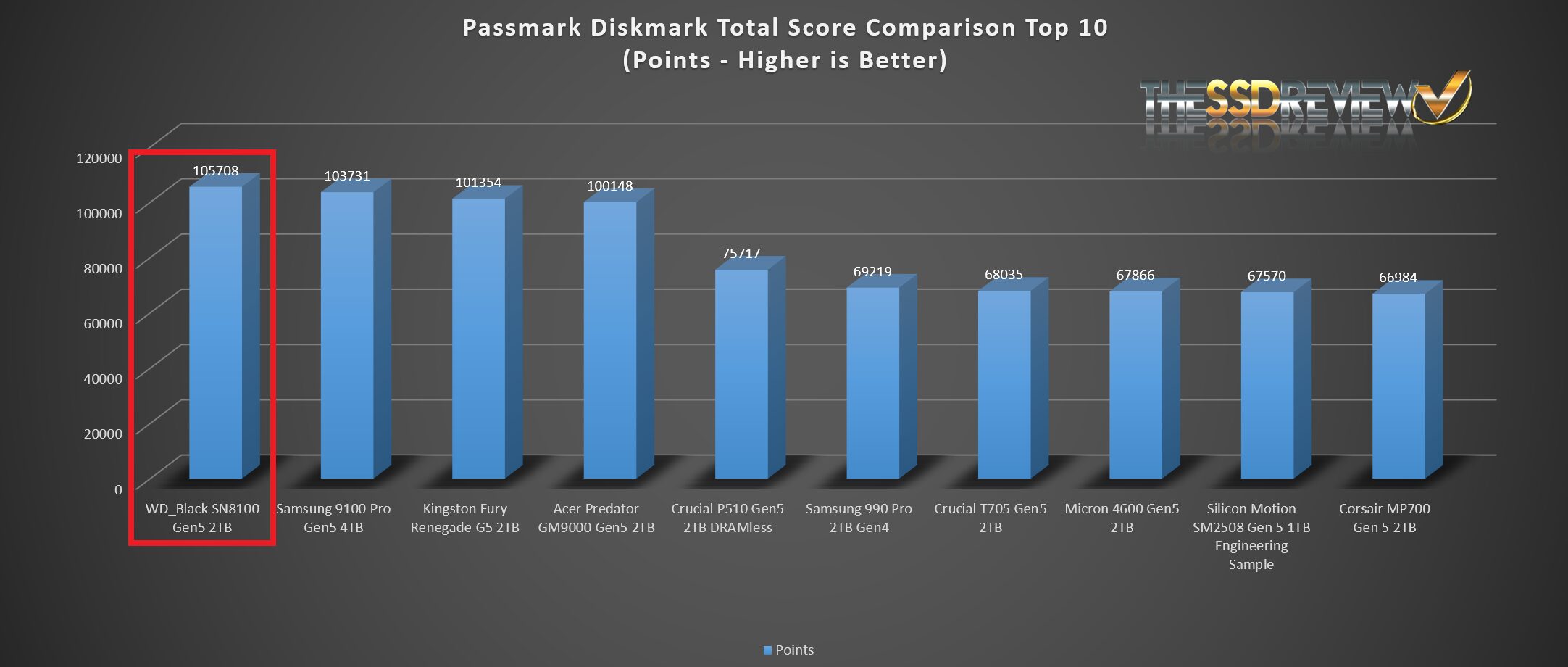
We thought we might add a few extras in our report today, PassMark Performance Test DiskMark component being a nice addition. This software tests sequential reads and writes, along with IOPS and compares the result with millions of other SSDs worldwide.
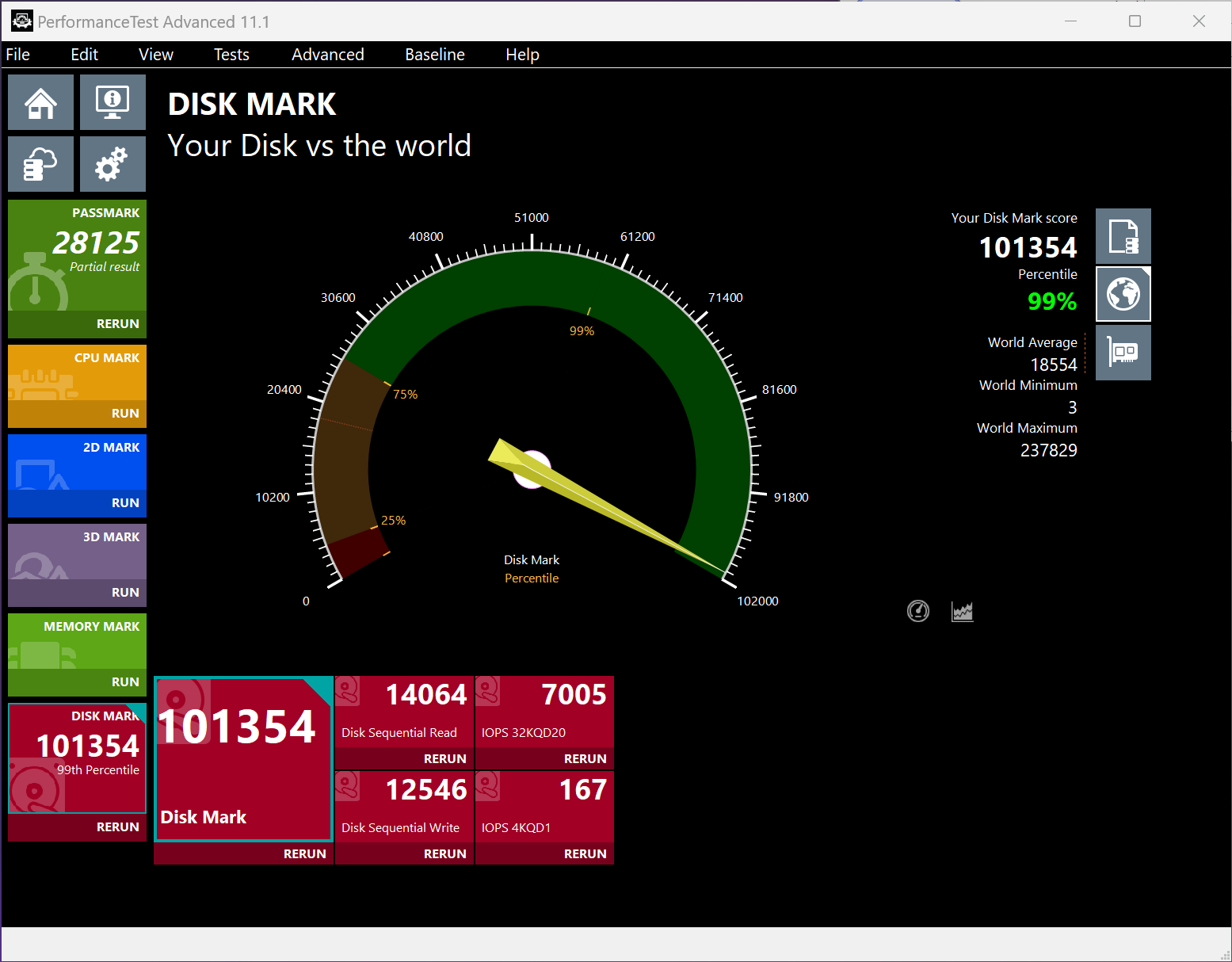
Top score ever received on Performance Test and in the 99th precentile of recorded results worldwide.
FINAL FANTASY XIV: ENDWALKER BENCHMARK
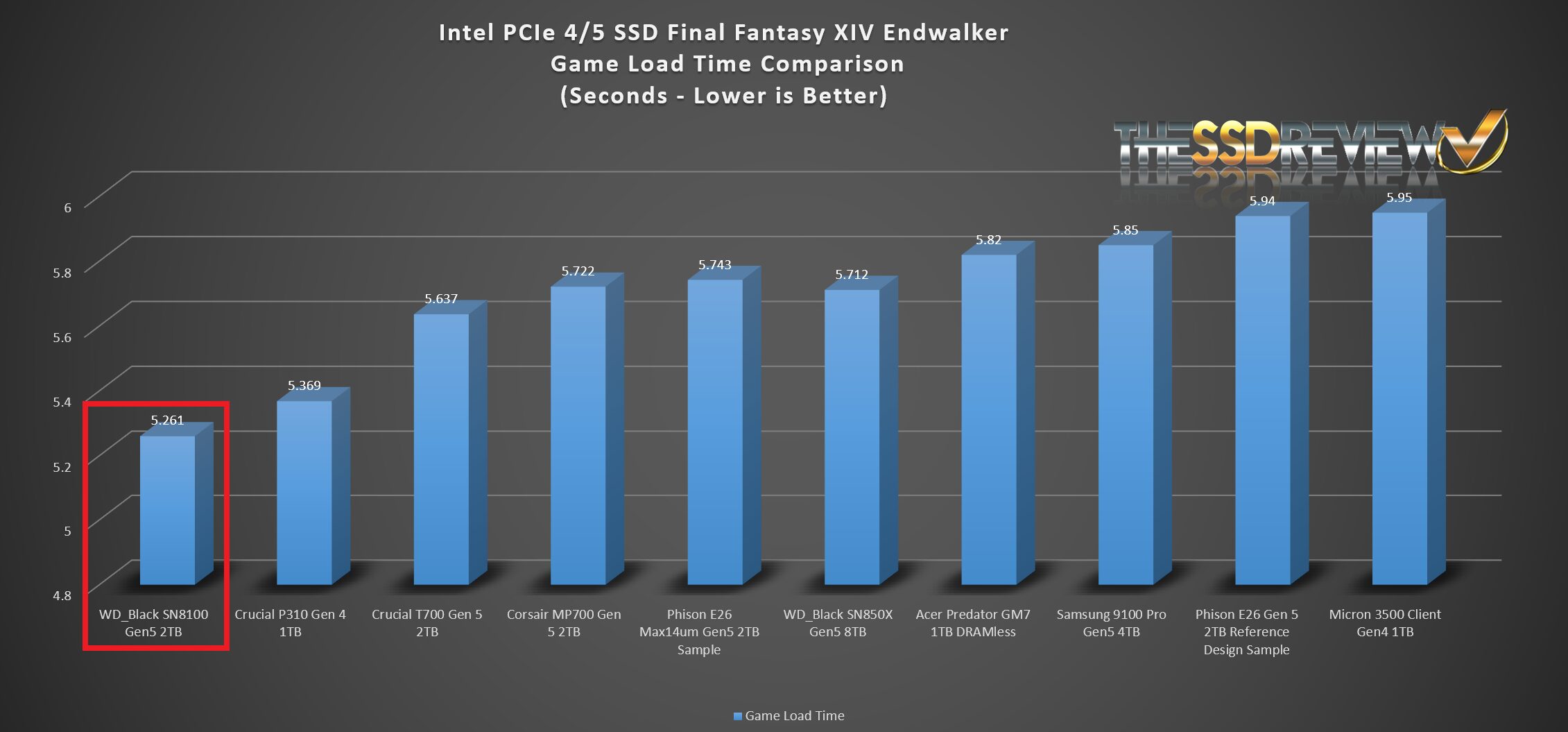
The Final Fantasy Benchmark is a new tool in our arsenal and geared specifically to the gamer. The software is installed directly on the SSD and the SSD tested, providing and end result of FPS and scene transition times.
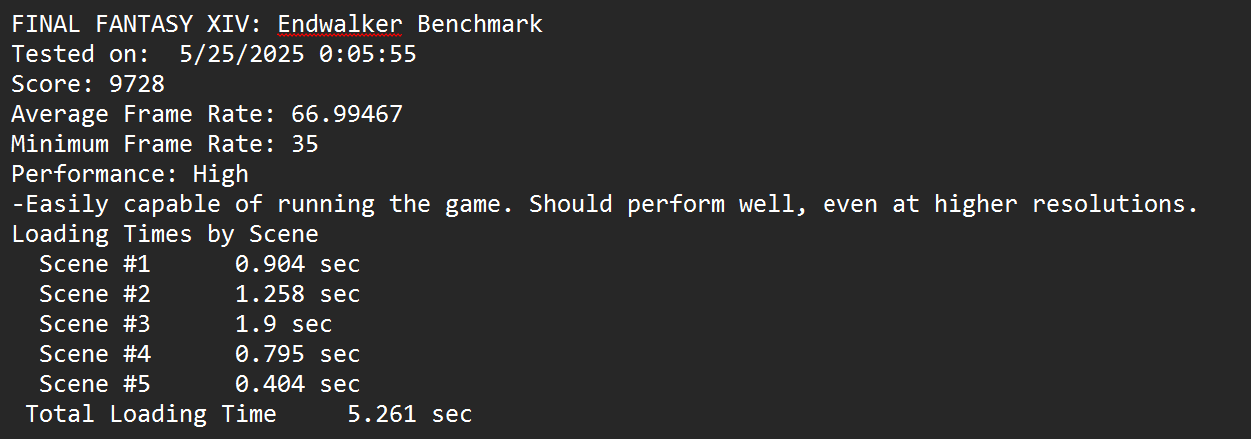
As expected, the WD_Black SN8100 Gen5 SSD topped our game loading benchmark with an incredible 5.261 second time.
Would really like to see the Intel Optane 5800x on the charts for real world data testing. Would also like to see the steady state 4K Q1T1 tests on both the Optane and the 8100 side by side.
Optane’s strength likes in low queue depth consistency from what I’ve seen, since there is no cache blowout happening like on modern SSDs. Any chance of this being an Optane killer on things like a 70% full drive?
I was never able to obtain an Optane 5800x, but my 905 is still my OS drive for the low latency program launching. I use a 4TB NVMe 4.0 SSD for bulk storage. I would love to find a solution that didn’t require me to run an m.2 -> u.2 adapter for my OS drive, but so far the low latency + program launch time “feel” of the Optane wins vs. any SSD I’ve tried yet.
As described in our article, the two SSDs serve different purposes, the first being consumer related tasks while the second is data center. For this reason, we don’t provide steady state results or comparisons in our reports, unless they are specifically directed as being an enterprise report. Thanks for writing!
James is right, the Optane 5800X should have been compared. Prosumers don’t care what the drive was “intended” for. Pricing has come down enough that I’m considering an array of P5800X vs. SN8100’s and it would have been nice to quantify the performance difference at low queue-depths, as well as both sequential and random performance once the SN8100’s cache has been saturated.
Here’s a side-by-side of the SN8100 vs Optane P5800X. The tests were done by different individuals on different systems, but at least provide a sense of comparative performnace: https://abulhassan.com/wd-black-sn8100-2tb-vs-intel-optane-p5800x-nvme-ssd/
Absolutely love this level of dedication — nothing says “storage geek” like testing SSDs at 4:30am right after a transpacific flight! Those Gen5 drives hitting 14GB/s are wild, especially seeing a DRAMless model push that performance barrier. Curious to see how thermal throttling is handled under sustained loads.
We recently benchmarked some enterprise-grade Dell SAS SSDs in a G14-series rack — obviously not Gen5, but still rock-solid for mixed-use environments where endurance and hot-swap reliability matter more than raw speed. Totally different use case, but fun to compare evolution across form factors.
Keep pushing the envelope — and enjoy that jet lag.
I hope you get as much sleep as you need because I’m hoping for a test of the new Crucial T710 that was announced at Computex as soon at its available. It will make for an interesting 3 way shootout between the WD 8100, Samsung 9100 and Crucial 710 when all 3 are readily available, hopefully all with their own heat sinks. Sleep well!
The SN8100 will be tough to beat. It is an amazing SSD. We have received the order confirmation for the T710 from Micron so hopefully sooner than later.
It would be great to see a Samsung 9100 Pro test against the Z790 now to have a real comparison.
Thanks for your interesting articles. How to download TxBench? The https://www.texim.jp/txbenchus.html link is broken.
Fixed . Enjoy.
Thanks for the quick reply, but I cannot access
https://www.texim.jp/txbenchus.html
The web browser Safari 18.5 (18621.2.5.18.1, 18621) on macOS 13.7.6 (22H625) Ventura on Mac (Intel) says:
Safari Can’t Find the Server
Safari can’t open the page “https://www.texim.jp/txbenchus.html” because Safari can’t find the server “www.texim.jp”
How to download TxBench? I think it is for Windows (not for Mac) but I would like to download it anyway. Thanks again for all.
Yes. I understand. If you click on the title, the referring link has been changed.
Thanks. Which title? What is the working link?
Great review! As I understand it, Dashboard application is not discontinued but just changed from Western Digital to SanDisk one. The new version is available on SanDisk website and not on Western Digital, here: https://support-en.sandisk.com/app/answers/detailweb/a_id/31759
Thanks for that.
i bought a 2tb hoping it would downgrade to PCI-e 4.0 x4, nope, unfortunately my system decided to downgrade it to 1.0 x1, had to return it. even though my amd 7945hx supports pci-e 5.0 on a technical level, it only supports nvme pci-e up to 4.0. its too bad that it couldnt just downgrade. ended up buying a different 4.0 x4 nvme. believe me, i gave it all the testing and checking before giving up. it was already apparent to me when it required 2-5 minutes to post bios each time that it wasnt going to get past this issue.
I checked extensiively and you seem to be the only instance of this issue. Sorry but I have no suggestions except maybe a fresh install.
Amazing performance in the review. I purchased a 2 GB and 4 GB to run in my setup, and performance is significantly lower. My SEQ1M score is very high (14956 Read / 14169 Write). However, SEQ12K drops to 9300 Read / 11,071 Write. RND4K drops substantially lower compared to review, at 1070 Read and 923 Write. My 3DMark SSD Storage score is also only 5,100 at best. This is on a 9950X3D system with MSI X870E Tomahawk motherboard. Appreciate any suggestions on troubleshooting.
check your heat, i had the same issue , installed 3rd party heat sink (thermalrite HR-10 pro) and no more throttling during benchmarks