 The SSD Review The Worlds Dedicated SSD Education and Review Resource |
3DMARK STORAGE GAMING BENCHMARK
UL Solutions has created a new storage gaming benchmark that we will start to use as new SSDs come in. The 3DMark Storage Benchmark DLC extends 3DMark Advanced Edition with a dedicated component test for measuring the gaming performance of SSDs and other storage hardware. It supports all the latest storage technologies and tests practical, real-world gaming performance for activities such as loading games, saving progress, installing game files, and recording gameplay video streams.
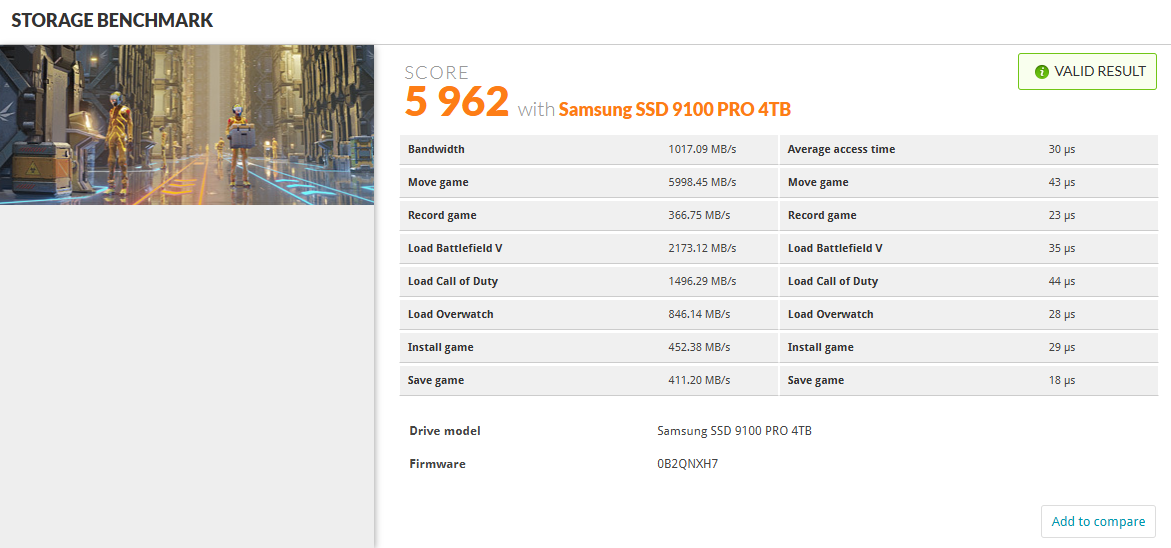
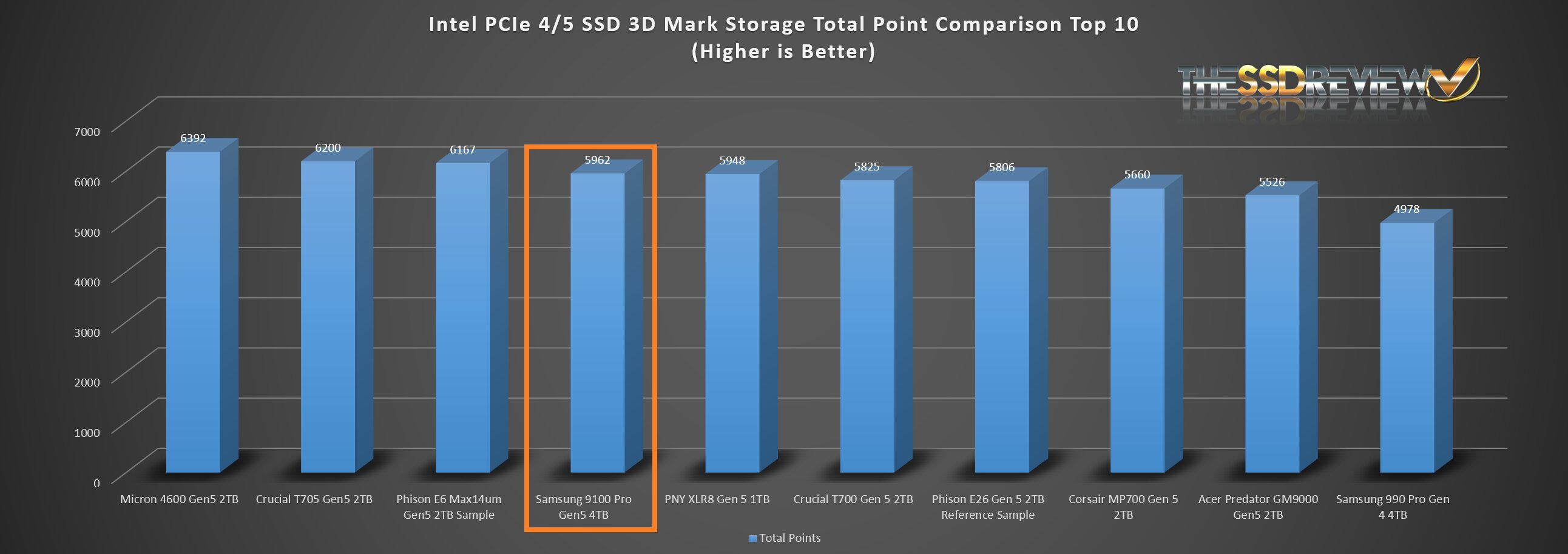
The Samsung 9100 Pro placed fourth of all 3DMark Storage Benchmark tests to date which is excellent considering this benchmark is the truest real world type test available.
REPORT ANALYSIS AND FINAL THOUGHTS
The Samsung 9100 Pro Gen5 SSD was lucky enough, or unlucky enough as it may be, to come across our desk at just the time that we were building two new Z890 Test benches and it immediately became our target SSD for these systems. We have put over 48TBW of testing through this and we can test it again right now and still receive that same excellent performance that we published here. It comes in at over 14GB/s throughput with over 2 million IOPs and stands to date as the best SSD we have put through our test regimen.
Having said that, it didn’t walk away with all of our real world testing, however it did place in the Top 10 for all tests and was the clear winner in our synthetic tests. As much as it has become common for SSDs to have 5-year limited warranties, we have to give credit where credits due as we live in a world of 1-year warranties for most everything we buy these days. Last but not least the pricing is way up there… It is the norm with new Gen SSDs but will settle in as it always does. Gen5 SSDs and that 14GB/s speed with 12 million IOPS are meant to attract those that need that performance. MSRP is simply that… MSRP. Availability will be there and Samsung drives have one heck of a following.
CHECK SAMSUNG 9100 PRO AVAILABILITY AND PRICING AT AMAZON

Hi Les, Thanks for the review. Quick question if you dont mind…Did you test the 9100 pro in the PCIe 5×4 m.2 slot or did you test it with a PCIe adapter in one of the PCIe 5 slots?
The drive was tested in the former Z790 Gen HyperSSD AIC and not the M2 slot. Current Gen motherboards do not allow full performance from 14GB/s SSDs and we may be writing an article on this in a week or so… Waiting for a return from Intel. Presently, 14GB/s ssds only achieve 12GB/s speeds in the M2 slot and we have confirmed this in a number of different boards and can also validated it from several other tests and Internet posts of other sites.
Thanks for the reply! That is what I am experiencing also. Extremely nice drive though.
Take a look at our report posted just today. Can you detail the motherboard and SSD you are using? ANything else that may habve been observed?
Hi Les,
Have you received any additional information regarding this issue with the Gen 5 M2 slot performance?
Report posted this morning. Can you detail the motherboard and SSD you are using? ANything else that may habve been observed?
Thanks for the review and the additional information on the slow speeds on z890 motherboards! I am getting nearly identical results that you are seeing, both the slow speeds in the m.2 slot, and the full speeds using a PCIe 5 to m.2 adapter. This is on an MSI PRO Z890-A WIFI motherboard using a Samsung 9100 Pro ssd. MSI has not yet acknowledged that this is an issue. I have been providing information to Intel, but they have not provided any solutions.
@Les: Does the M.2 slot vs PCIe differences of PCIe 5 cards capable of over 12,000 GB/s also impact TRX50 and WRX50 (AMD Threadripper) motherboards?
Also for Intel Optane Memory p5800x 1.6TB SSD users such as myself, do you recommend I still use it as a boot drive vs. these PCie 5 cards? If so, what you anticipate NAND SSDs need to be more capable of with PCie 5/6 to dethrone such SSDs for such purposes?
I’m about to create a new Threadripper 9000 rig and was curious
* Note I’m aware of the WD_Black SN8100 Gen5 SSD review that beat the p5800x in a particular benchmark; just felt it was more appropriate to ask here re: the differences using Gen 5 SSDs in M.2 slots vs PCie SSD AIC cards
I don’t use M.2 slots. I use the ASUS Hyper card when testing SSDs to ensure full performance.
The 12GB/s limitation in M.2 slots is limited to Intel 200 series boards alone. With respect to the P5800x continuing as your boot drive, it is really a matter of personal preference when you compare the speed of SSDs today. Modern SSDs have surpassed Optane performance in all but one area… low random 4K read performance which still sits at over 400MB/s. You are still 3x on load times compared to non-Optane users.
Understood; thanks for taking the time well after this review to provide additional nuance and context with your experience with your PCIe 5 Gen SSDs.
Continue the great work!
Just to make sure: My 1.6TB Optane P5800x is still 3x faster on load times compared to non-Optane users to your estimation or slower?
Your Optane has low random reads above 400MB/s which has never been achieved by any other SSD, consumer, client or enterprise. That’s your answer to right there.