 The SSD Review The Worlds Dedicated SSD Education and Review Resource |
PCMARK 10 FULL SYSTEM STORAGE BENCHMARK
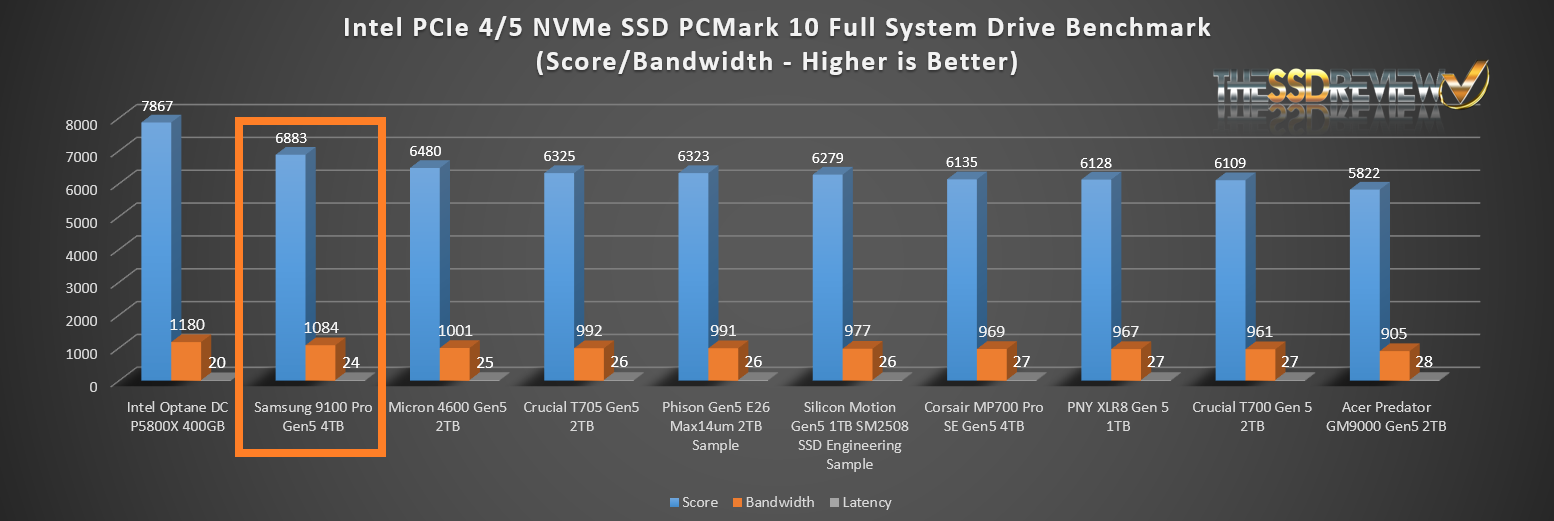
PCMark 10 Storage Benchmarks produce an overall score as a measure of drive performance. Comparing devices is as simple as comparing scores. The tests also measure and report the bandwidth and average access time performance for the drive. Each test uses traces recorded while performing real-world tasks such as booting Windows 10, starting applications such as Adobe Photoshop and Illustrator, working with applications such as Microsoft Excel and PowerPoint, and copying several large files and many small files.

This chart depicts the Top 10 SSD results received to date when testing in PCMark 10 Full System Benchmark. The Samsung 9100 Pro Gen5 4TB SSD did extremely well placing in the No. 2 position just behind the Intel Optane P5800x SSD.
PCMARK 10 QUICK SYSTEM STORAGE BENCHMARK
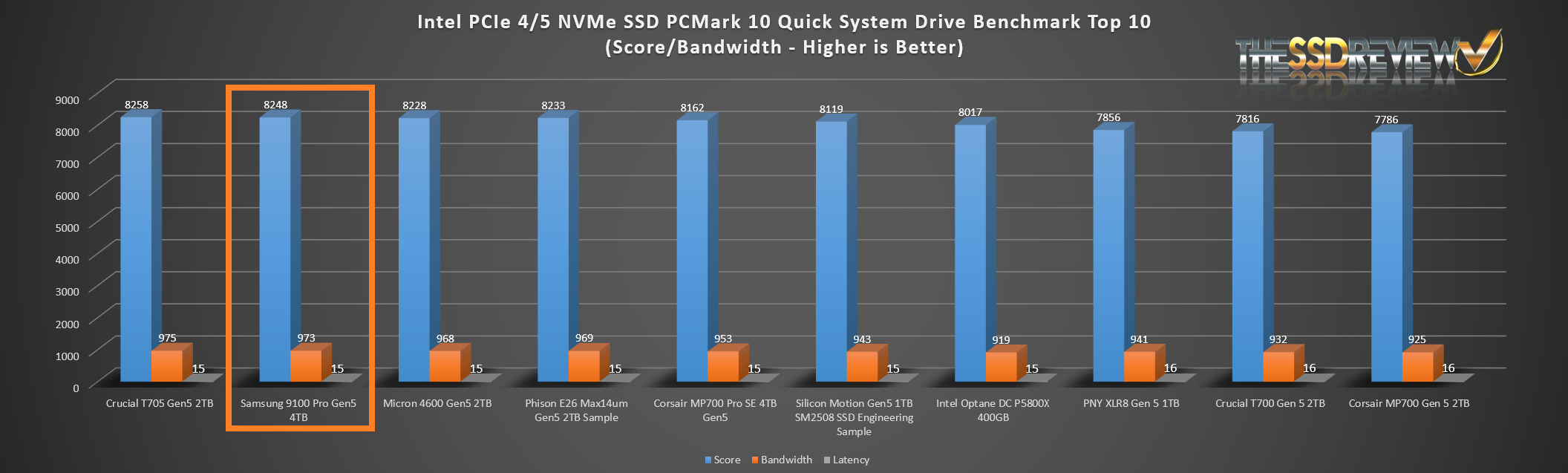
The Quick System Drive Benchmark is a subset of the Full test and is more representative of typical daily usage to show what would be expected regarding hybrid SSD performance on a day-to-day basis.

This chart depicts the Top 10 SSDs tested to date, to which the Samsung 9100 Pro Gen5 4TB SSD placed in the No. 2 spot once again.
TRUE DATA TESTING
For our True Data Testing, we simply loaded 15GB video, music, photo and OS files onto the Samsung 9100 Pro Gen5 4TB SSD and copied the data to a new folder on that same disk.
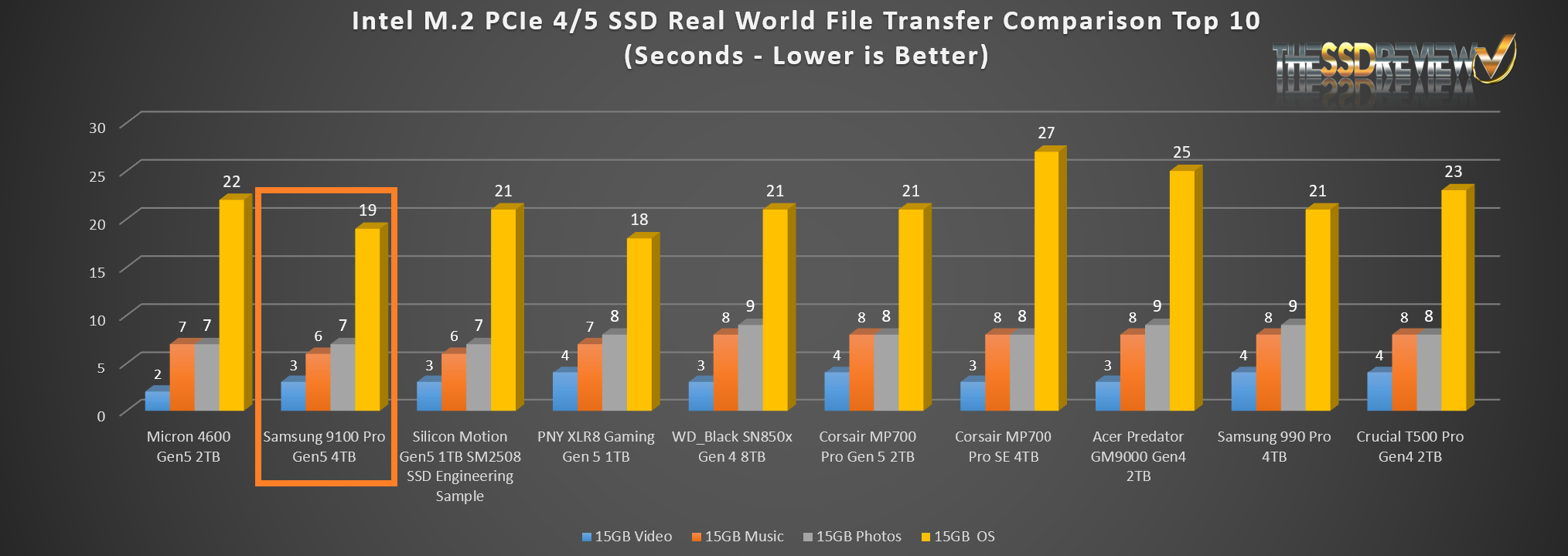
The Samsung 9100 Pro Gen5 4TB SSD placed 2nd in SSDs tested to date just behind the Micron 4600 Gen5 2TB SSD.
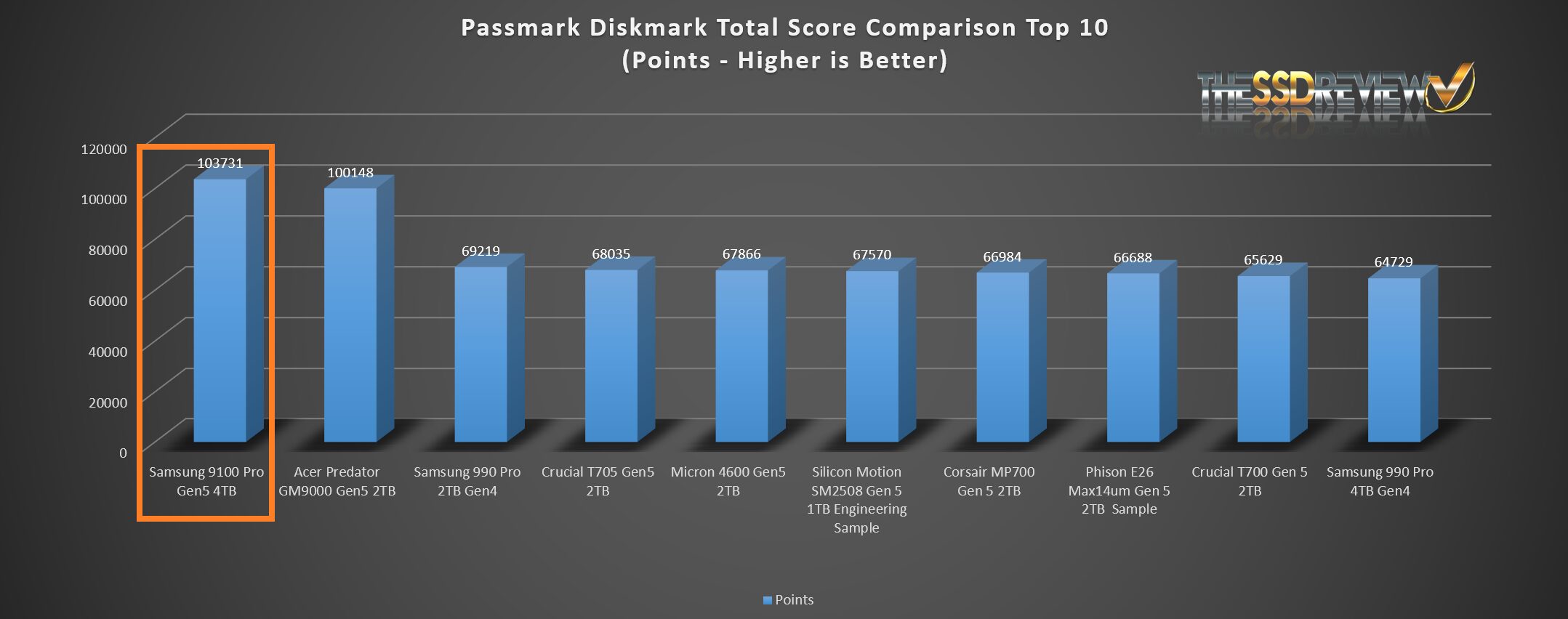
We thought we might add a few extras in our report today, PassMark Performance Test DiskMark component being a nice addition. This software tests sequential reads and writes, along with IOPS and compares the result with millions of other SSDs worldwide. We might suggest being in the 99th percentile of all SSDs tested was a nice result
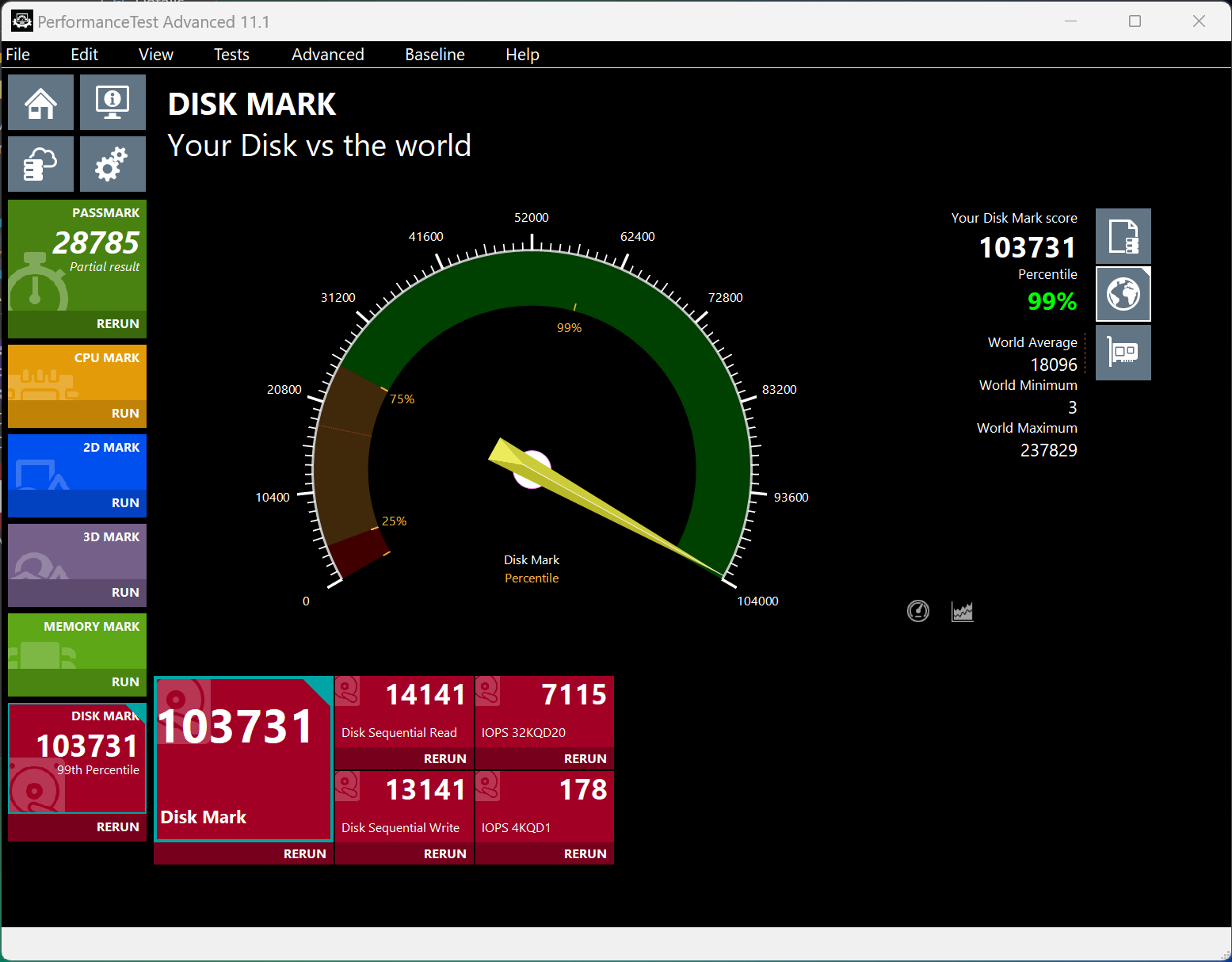 The Samsung 9100 Gen5 4TB SSD achieved the top mark to date in PassMark DiskMark and placed in the top 99% of all SSDs tested to date.
FINAL FANTASY XIV: ENDWALKER BENCHMARK
The Final Fantasy Benchmark is a new tool in our arsenal and geared specifically to the gamer. The software is installed directly on the SSD and the SSD tested, providing and end result of FPS and scene transition times.
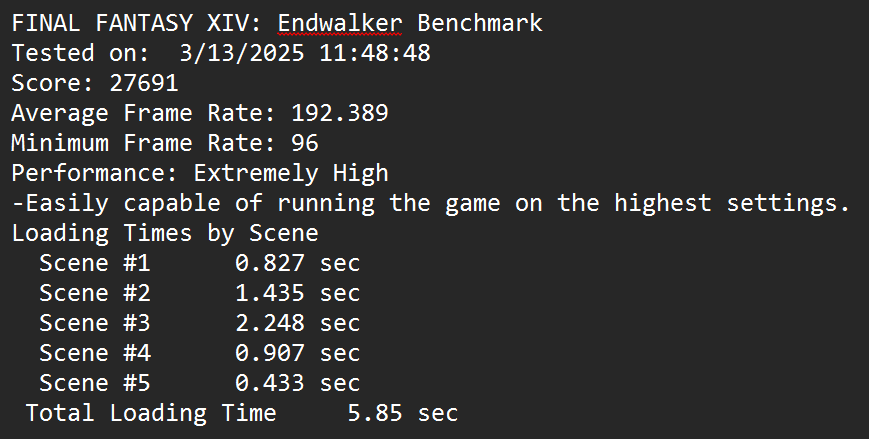
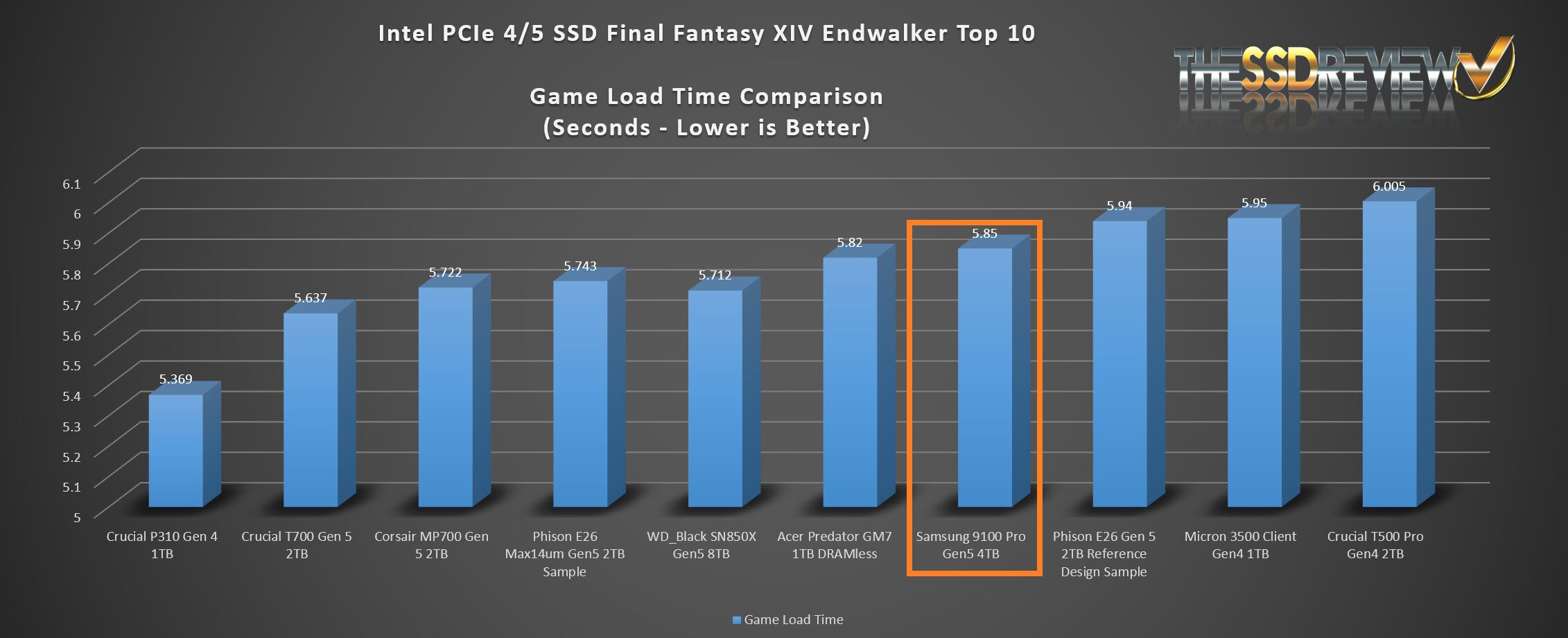
The Samsung 9100 Pro placed very well in game load time testing and is the 7th best SSD tested to date with respect to game load time.
Hi Les, Thanks for the review. Quick question if you dont mind…Did you test the 9100 pro in the PCIe 5×4 m.2 slot or did you test it with a PCIe adapter in one of the PCIe 5 slots?
The drive was tested in the former Z790 Gen HyperSSD AIC and not the M2 slot. Current Gen motherboards do not allow full performance from 14GB/s SSDs and we may be writing an article on this in a week or so… Waiting for a return from Intel. Presently, 14GB/s ssds only achieve 12GB/s speeds in the M2 slot and we have confirmed this in a number of different boards and can also validated it from several other tests and Internet posts of other sites.
Thanks for the reply! That is what I am experiencing also. Extremely nice drive though.
Take a look at our report posted just today. Can you detail the motherboard and SSD you are using? ANything else that may habve been observed?
Hi Les,
Have you received any additional information regarding this issue with the Gen 5 M2 slot performance?
Report posted this morning. Can you detail the motherboard and SSD you are using? ANything else that may habve been observed?
Thanks for the review and the additional information on the slow speeds on z890 motherboards! I am getting nearly identical results that you are seeing, both the slow speeds in the m.2 slot, and the full speeds using a PCIe 5 to m.2 adapter. This is on an MSI PRO Z890-A WIFI motherboard using a Samsung 9100 Pro ssd. MSI has not yet acknowledged that this is an issue. I have been providing information to Intel, but they have not provided any solutions.
@Les: Does the M.2 slot vs PCIe differences of PCIe 5 cards capable of over 12,000 GB/s also impact TRX50 and WRX50 (AMD Threadripper) motherboards?
Also for Intel Optane Memory p5800x 1.6TB SSD users such as myself, do you recommend I still use it as a boot drive vs. these PCie 5 cards? If so, what you anticipate NAND SSDs need to be more capable of with PCie 5/6 to dethrone such SSDs for such purposes?
I’m about to create a new Threadripper 9000 rig and was curious
* Note I’m aware of the WD_Black SN8100 Gen5 SSD review that beat the p5800x in a particular benchmark; just felt it was more appropriate to ask here re: the differences using Gen 5 SSDs in M.2 slots vs PCie SSD AIC cards
I don’t use M.2 slots. I use the ASUS Hyper card when testing SSDs to ensure full performance.
The 12GB/s limitation in M.2 slots is limited to Intel 200 series boards alone. With respect to the P5800x continuing as your boot drive, it is really a matter of personal preference when you compare the speed of SSDs today. Modern SSDs have surpassed Optane performance in all but one area… low random 4K read performance which still sits at over 400MB/s. You are still 3x on load times compared to non-Optane users.
Understood; thanks for taking the time well after this review to provide additional nuance and context with your experience with your PCIe 5 Gen SSDs.
Continue the great work!
Just to make sure: My 1.6TB Optane P5800x is still 3x faster on load times compared to non-Optane users to your estimation or slower?
Your Optane has low random reads above 400MB/s which has never been achieved by any other SSD, consumer, client or enterprise. That’s your answer to right there.