 The SSD Review The Worlds Dedicated SSD Education and Review Resource |
CRYSTAL DISK BENCHMARK VER. 8.0.4 x64
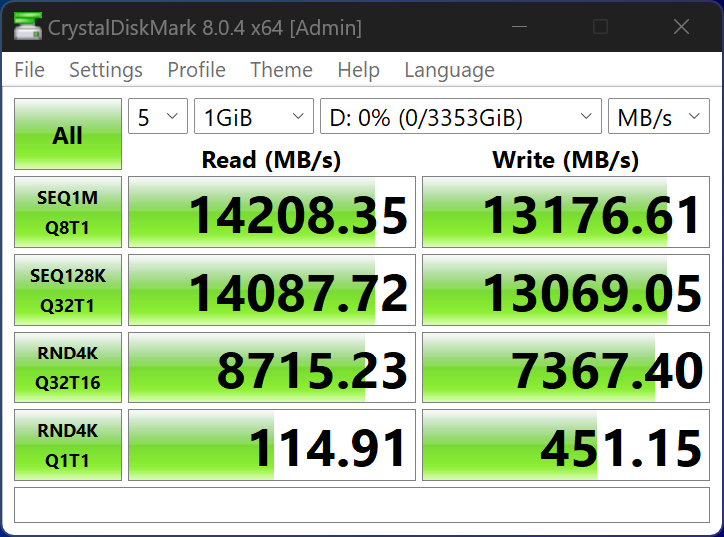
Crystal Disk Benchmark is used to measure read and write performance through sampling of random data which is, for the most part, incompressible. Performance is virtually identical, regardless of data sample so we have included only that using random data samples.
THROUGHPUT
IOPS
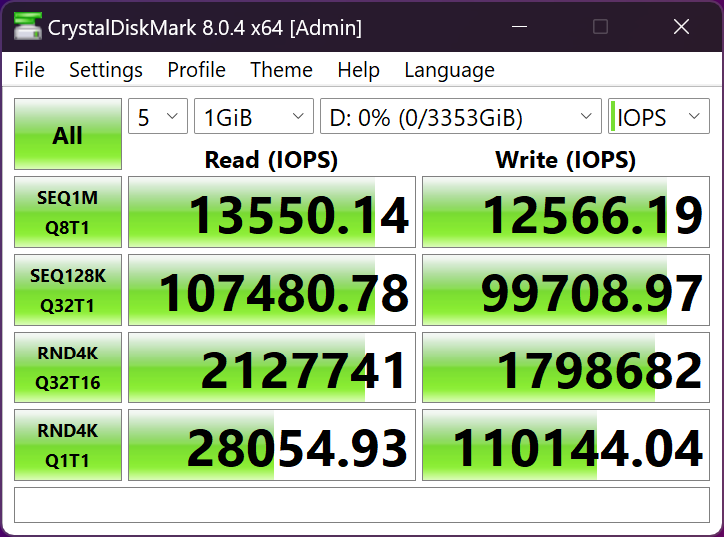
Admittedly, I am more of a fan of that 114MB/s read and 451MB/s random 4K Q1T1 write results than those high sequentials. Tie that in with over 2 million IOPS and this is the best Crystal DiskMark result we have ever seen.
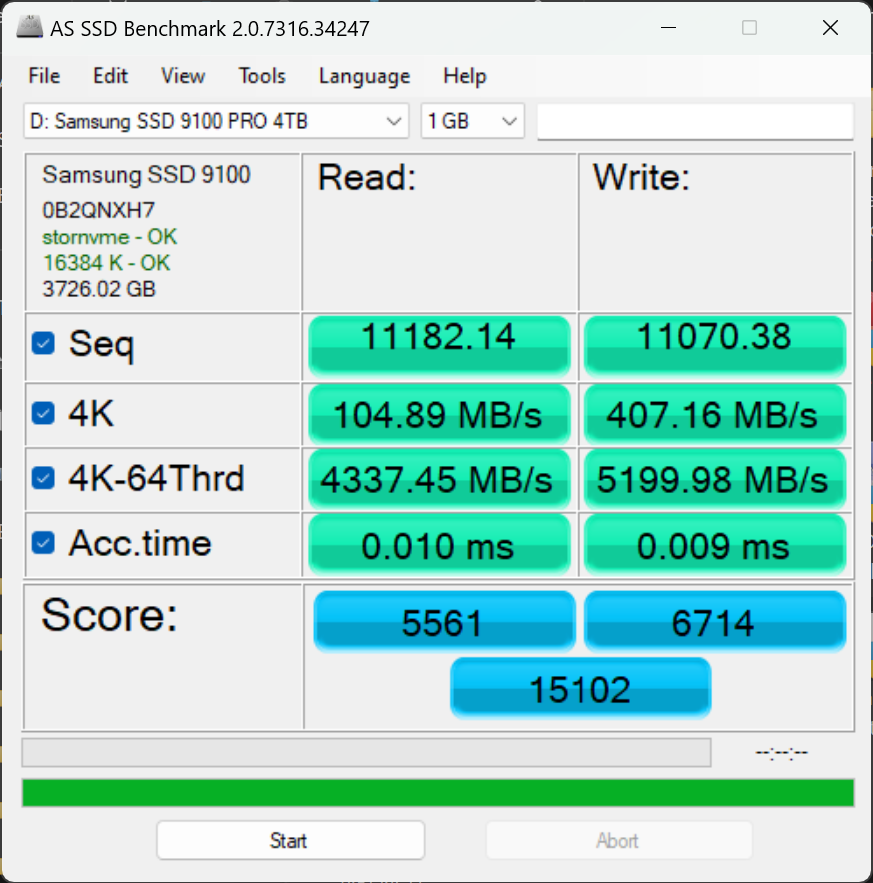
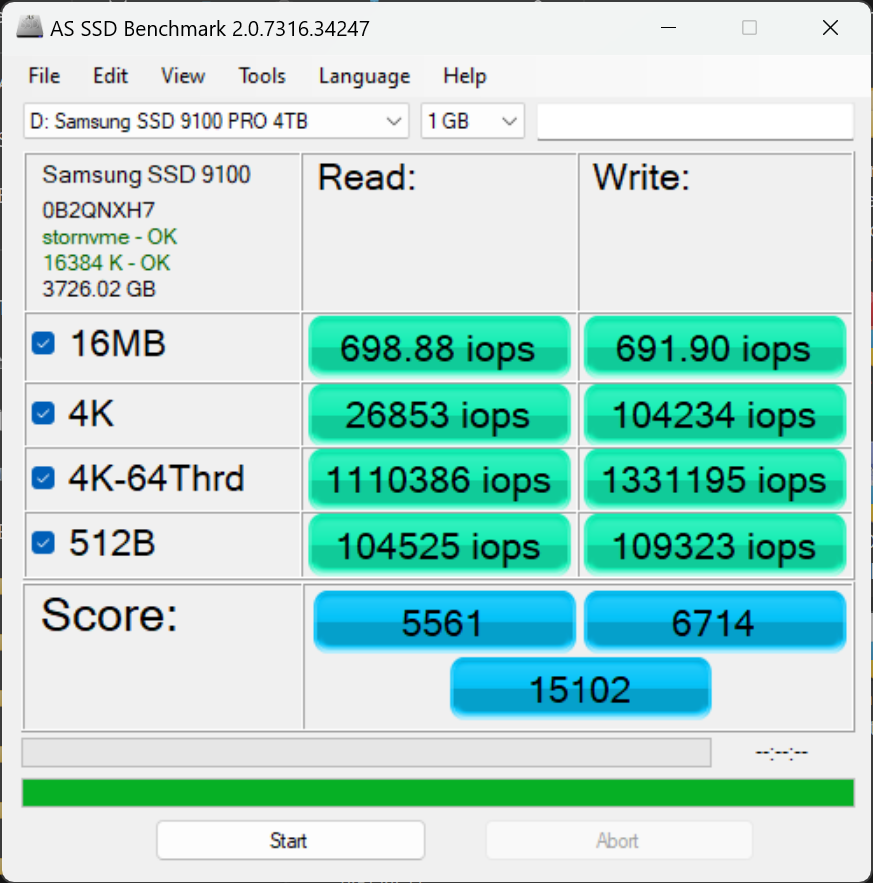
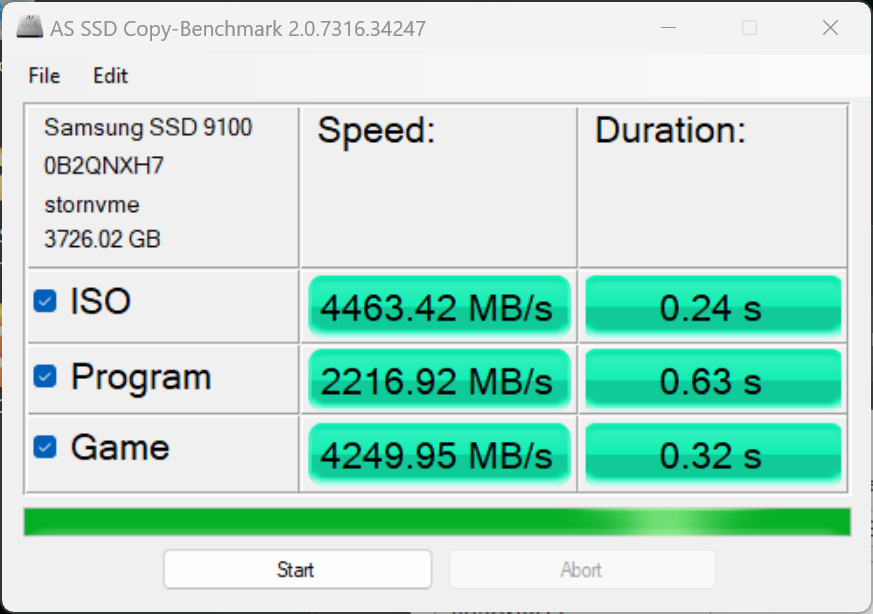
The toughest benchmark available for solid state drives is AS SSD as it relies solely on incompressible data samples when testing performance. For the most part, AS SSD tests can be considered the ‘worst case scenario’ in obtaining data transfer speeds and many enthusiasts like AS SSD for their needs.
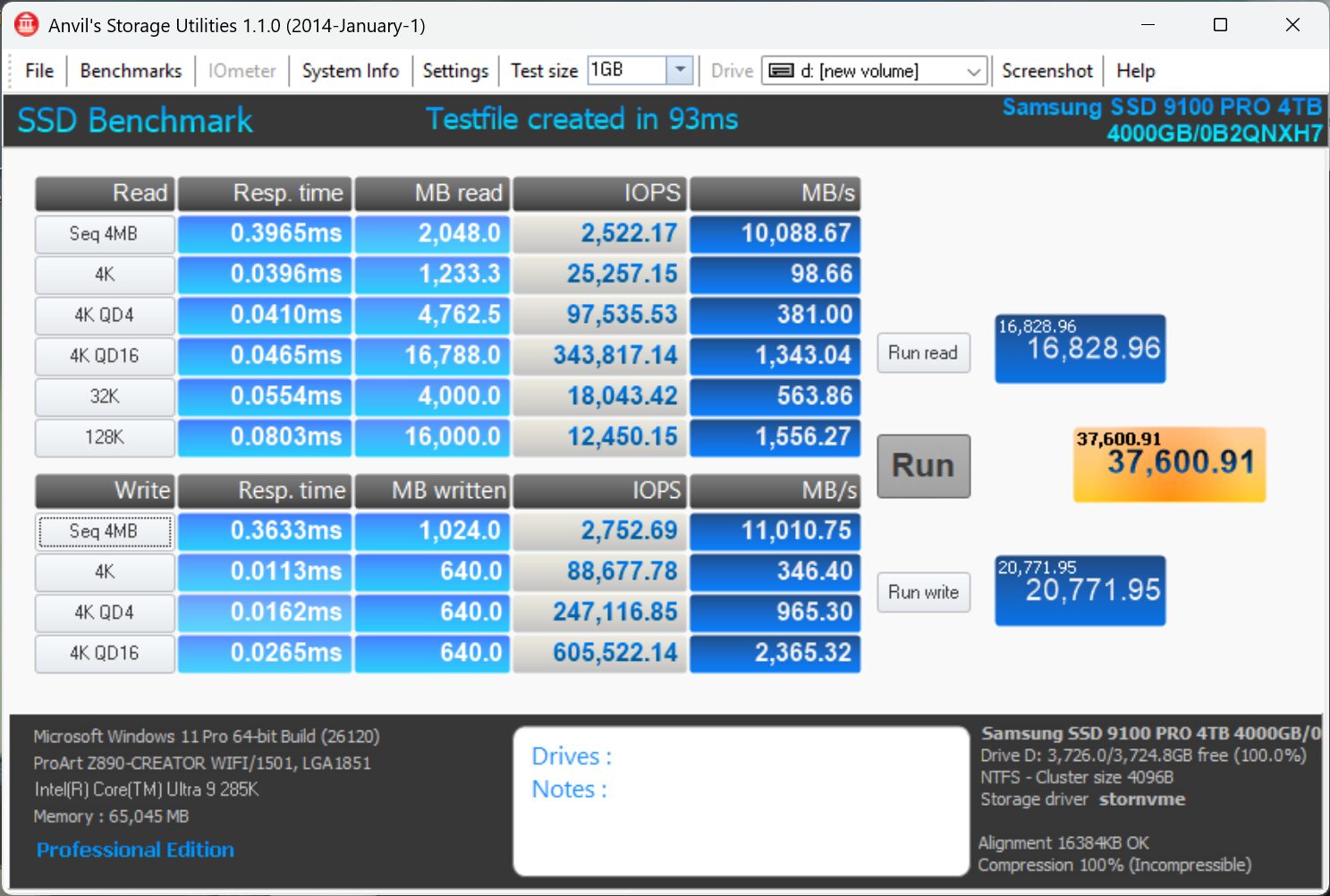
ANVIL STORAGE UTILITIES PROFESSIONAL
Anvil’s Storage Utilities (ASU) are the most complete test bed available for the solid state drive today. The benchmark displays test results for, not only throughput but also, IOPS and Disk Access Times. Not only does it have a preset SSD benchmark, but also, it has included such things as endurance testing and threaded I/O read, write and mixed tests, all of which are very simple to understand and use in our benchmark testing.
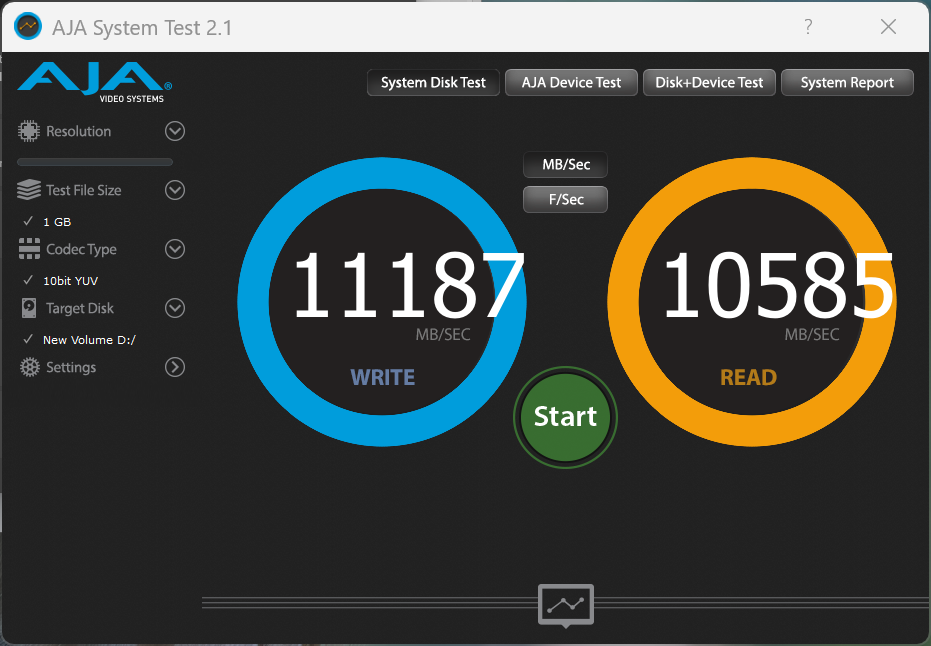
The AJA Video Systems Disk Test is relatively new to our testing and tests the transfer speed of video files with different resolutions and Codec.
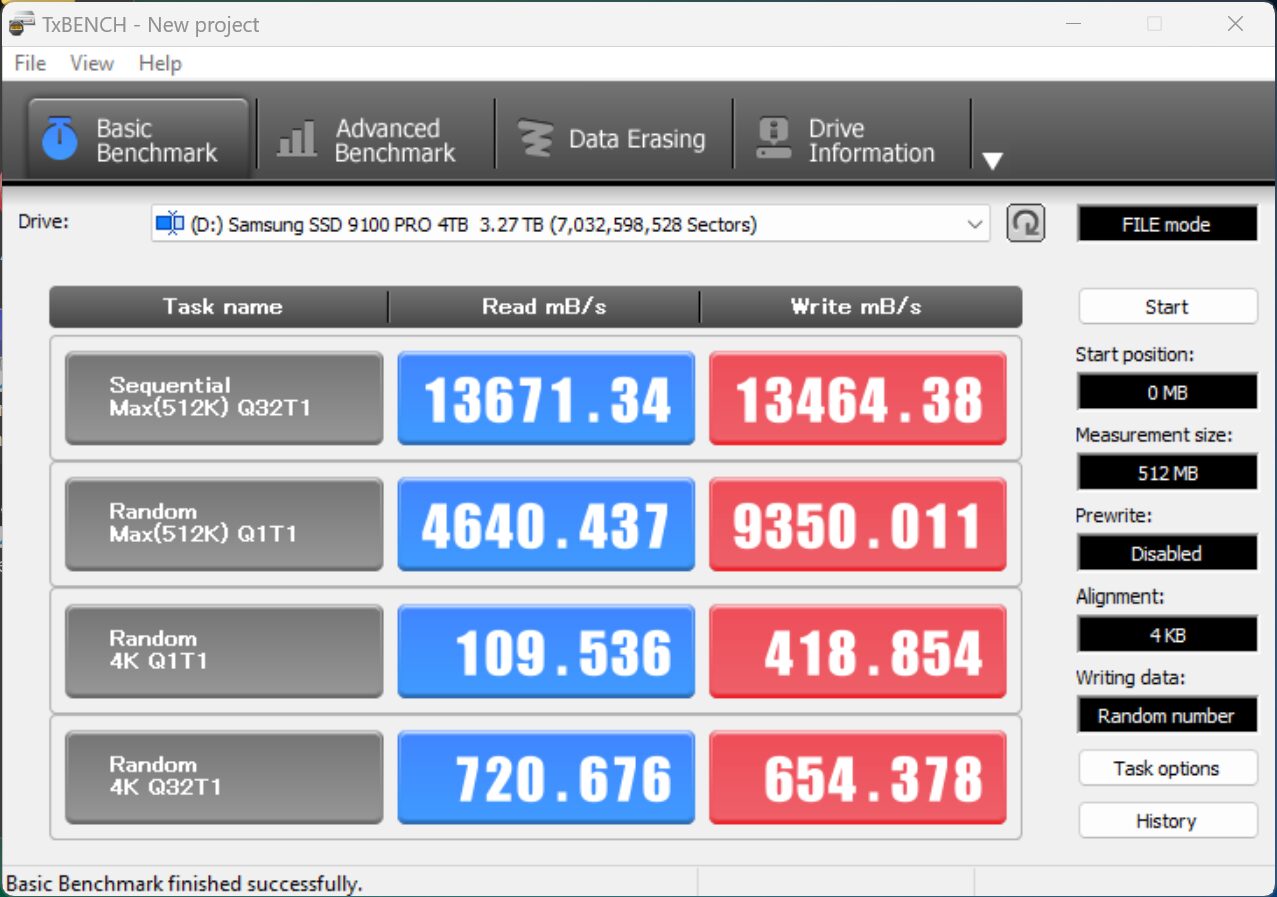
TxBench is one of our newly discovered benchmarks that we works much the same as Crystal DiskMark, but with several other features. Advanced load benchmarking can be configured, as well as full drive information and data erasing via secure erase, enhanced secure erase, TRIM and overwriting. Simply click on the title for a free copy.
Hi Les, Thanks for the review. Quick question if you dont mind…Did you test the 9100 pro in the PCIe 5×4 m.2 slot or did you test it with a PCIe adapter in one of the PCIe 5 slots?
The drive was tested in the former Z790 Gen HyperSSD AIC and not the M2 slot. Current Gen motherboards do not allow full performance from 14GB/s SSDs and we may be writing an article on this in a week or so… Waiting for a return from Intel. Presently, 14GB/s ssds only achieve 12GB/s speeds in the M2 slot and we have confirmed this in a number of different boards and can also validated it from several other tests and Internet posts of other sites.
Thanks for the reply! That is what I am experiencing also. Extremely nice drive though.
Take a look at our report posted just today. Can you detail the motherboard and SSD you are using? ANything else that may habve been observed?
Hi Les,
Have you received any additional information regarding this issue with the Gen 5 M2 slot performance?
Report posted this morning. Can you detail the motherboard and SSD you are using? ANything else that may habve been observed?
Thanks for the review and the additional information on the slow speeds on z890 motherboards! I am getting nearly identical results that you are seeing, both the slow speeds in the m.2 slot, and the full speeds using a PCIe 5 to m.2 adapter. This is on an MSI PRO Z890-A WIFI motherboard using a Samsung 9100 Pro ssd. MSI has not yet acknowledged that this is an issue. I have been providing information to Intel, but they have not provided any solutions.
@Les: Does the M.2 slot vs PCIe differences of PCIe 5 cards capable of over 12,000 GB/s also impact TRX50 and WRX50 (AMD Threadripper) motherboards?
Also for Intel Optane Memory p5800x 1.6TB SSD users such as myself, do you recommend I still use it as a boot drive vs. these PCie 5 cards? If so, what you anticipate NAND SSDs need to be more capable of with PCie 5/6 to dethrone such SSDs for such purposes?
I’m about to create a new Threadripper 9000 rig and was curious
* Note I’m aware of the WD_Black SN8100 Gen5 SSD review that beat the p5800x in a particular benchmark; just felt it was more appropriate to ask here re: the differences using Gen 5 SSDs in M.2 slots vs PCie SSD AIC cards
I don’t use M.2 slots. I use the ASUS Hyper card when testing SSDs to ensure full performance.
The 12GB/s limitation in M.2 slots is limited to Intel 200 series boards alone. With respect to the P5800x continuing as your boot drive, it is really a matter of personal preference when you compare the speed of SSDs today. Modern SSDs have surpassed Optane performance in all but one area… low random 4K read performance which still sits at over 400MB/s. You are still 3x on load times compared to non-Optane users.
Understood; thanks for taking the time well after this review to provide additional nuance and context with your experience with your PCIe 5 Gen SSDs.
Continue the great work!
Just to make sure: My 1.6TB Optane P5800x is still 3x faster on load times compared to non-Optane users to your estimation or slower?
Your Optane has low random reads above 400MB/s which has never been achieved by any other SSD, consumer, client or enterprise. That’s your answer to right there.