 The SSD Review The Worlds Dedicated SSD Education and Review Resource |
TSSDR TEST BENCH AND PROTOCOL
SSD testing at TSSDR differs slightly, depending on whether we are looking at consumer or enterprise storage media. Our newest Test Bench is comprised of the Intel Core Ultra 9 CPU set into the ASUS ProArt Z890-Creator motherboard with 64GB of Corsair Platinum Dominator DDR5-6400 memory. For media professionals, this motherboard contains two Thunderbolt 5 (80Gbps) ports, a Thunderbolt 4 (40Gbps) port and a USB 3.2 2×2 (20Gbps) Type-C port, something no other has done to date.

For this Test Bench, we just clicked on a few of the BIOS standard OC improvements and our new ProArt Z890 Test Bench is set at 5.6GHz while the 64GB Corsair Dominator Platinum DDR5-6400 memory settled in at 6600MHz. Download Aida64.
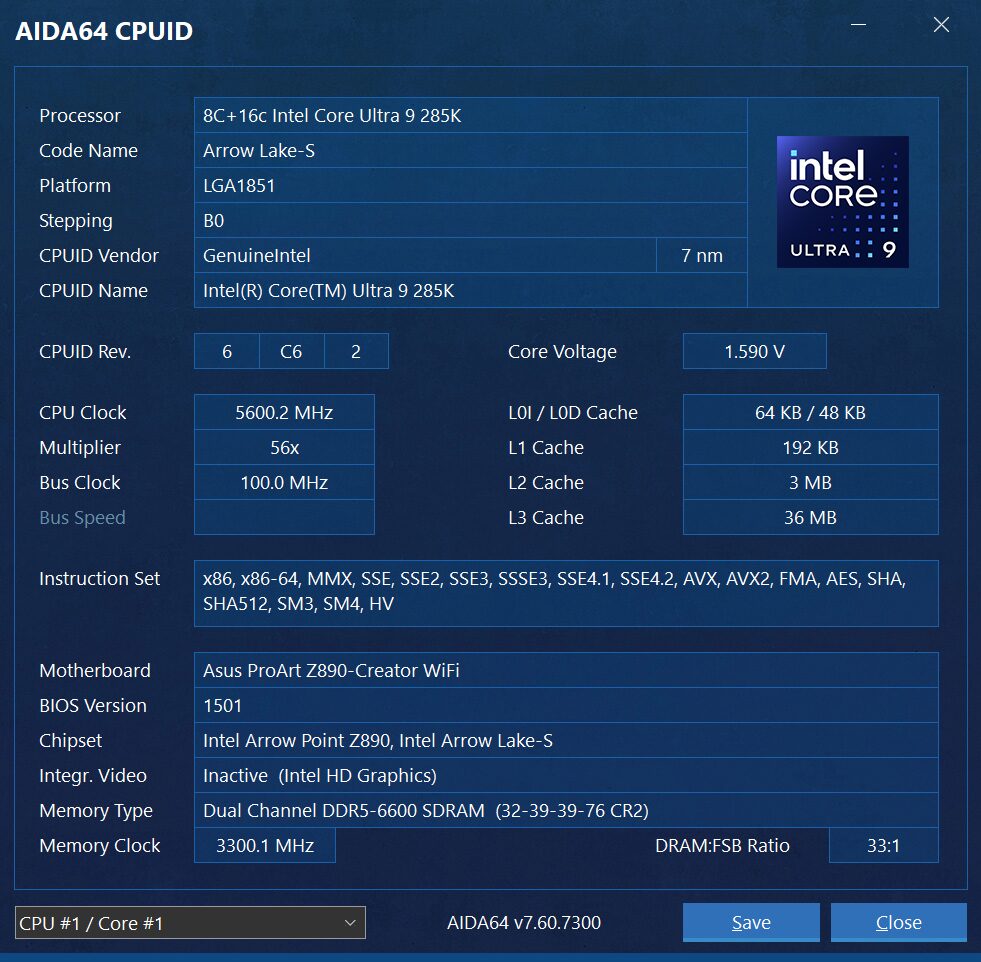
The components of this Test Bench are detailed below and have all been tested and/or spoken of in our own separate report of this test bench. All hardware is linked for purchase and product sales may be reached by a simple click on the individual item.
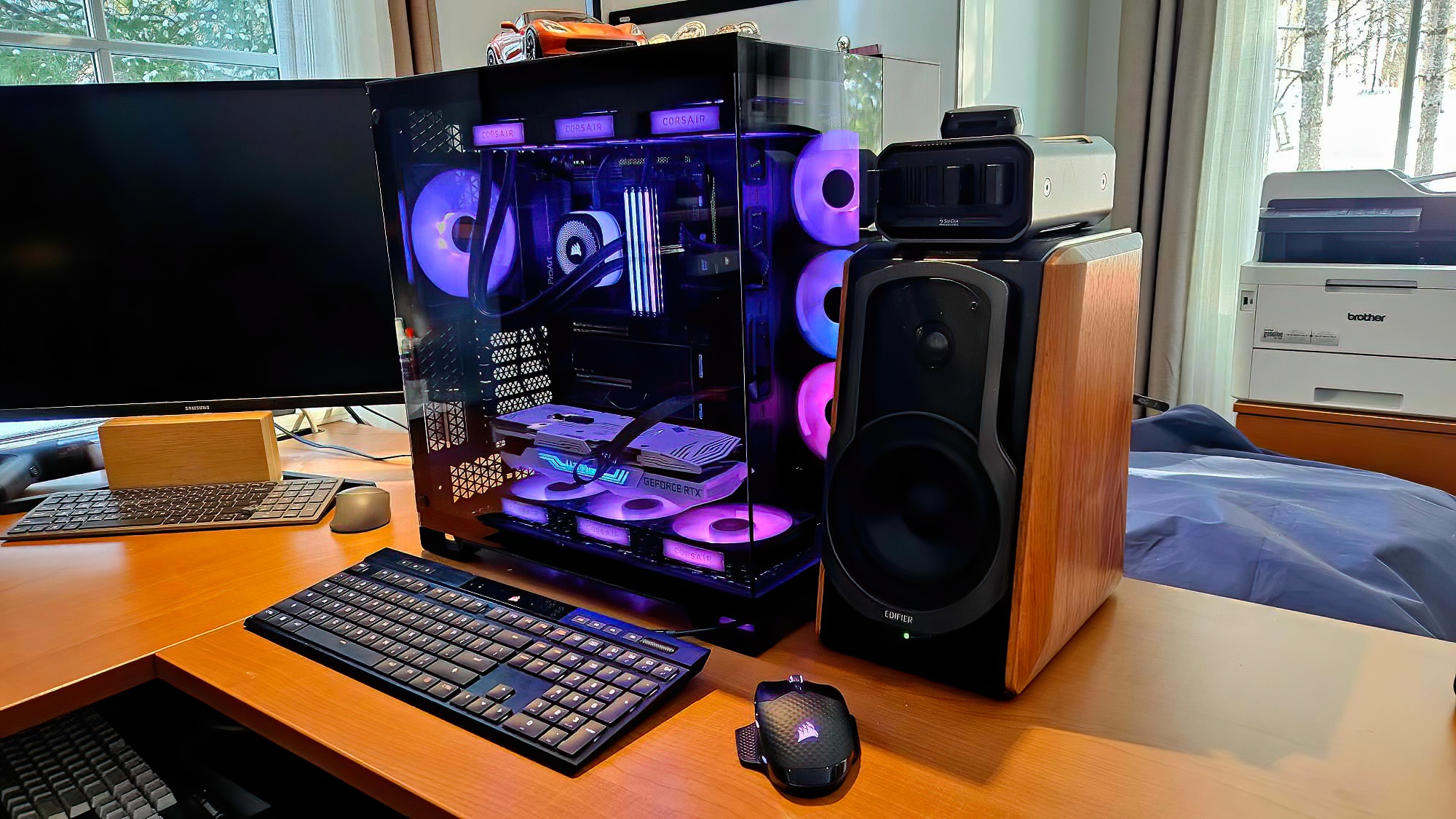
TSSDR INTEL ULTRA 9 ASUS PROART Z890 COMPONENTS (LINKED)
| PC CHASSIS: | Corsair iCUE Link 6500x RGB Mid-Tower Dual Chamber |
| MOTHERBOARD: | ASUS ProArt Z890-Creator WIFI LGA 1851 ATX |
| CPU: | Intel Ultra 9 Desktop Processor 285K |
| CPU COOLER: | Corsair iCUE Link Titan 360 RX RGB Liquid |
| POWER SUPPLY: | Corsair HX1000i Platinum Modular Ultra Low Noise |
| GRAPHICS: | ZOTAC GeForce RTX 3080 Trinity White |
| MEMORY: | Corsair Dominator Platinum 64GB DDR5-6400 |
| FANS: | Corsair iCUE Link RX120 MAX RGB |
| KEYBOARD: | Corsair K100 AIR Wireless RGB Mechanical |
| MOUSE: | Corsair Dark Core RGB Pro Wireless Gaming |
| MONITOR 32″x3 | Samsung 32 Inch Viewfinity UR59 4K |
A WORD ABOUT PERFORMANCE AND BUILDS
As can be seen above, we have just upgraded from a 13th Gen Intel Z790 Alder Lake system to the latest Intel Core Ultra 9 build where we saw the chipset move comfortably into PCIe 5.0. This alone may cause a performance increase, or decrease, in test results which we will hope to identify in our comparison charts once there are enough Gen 5 reviews to move them to their own chart. Our view is simply that we want to provide the reader with the best possible performance and there may be a mix and match of chipsets involved to achieve such. Logically, we simply haven’t the time to retest hundreds of SSDs every time we move up to a new platform. Thank you for understanding.
CRYSTAL DISK INFO VER. 9.6.0 X64
Crystal Disk Info is a great tool for displaying the characteristics and health of storage devices. It displays everything from temperatures, the number of hours the device has been powered, and even to the extent of informing you of the firmware of the device.
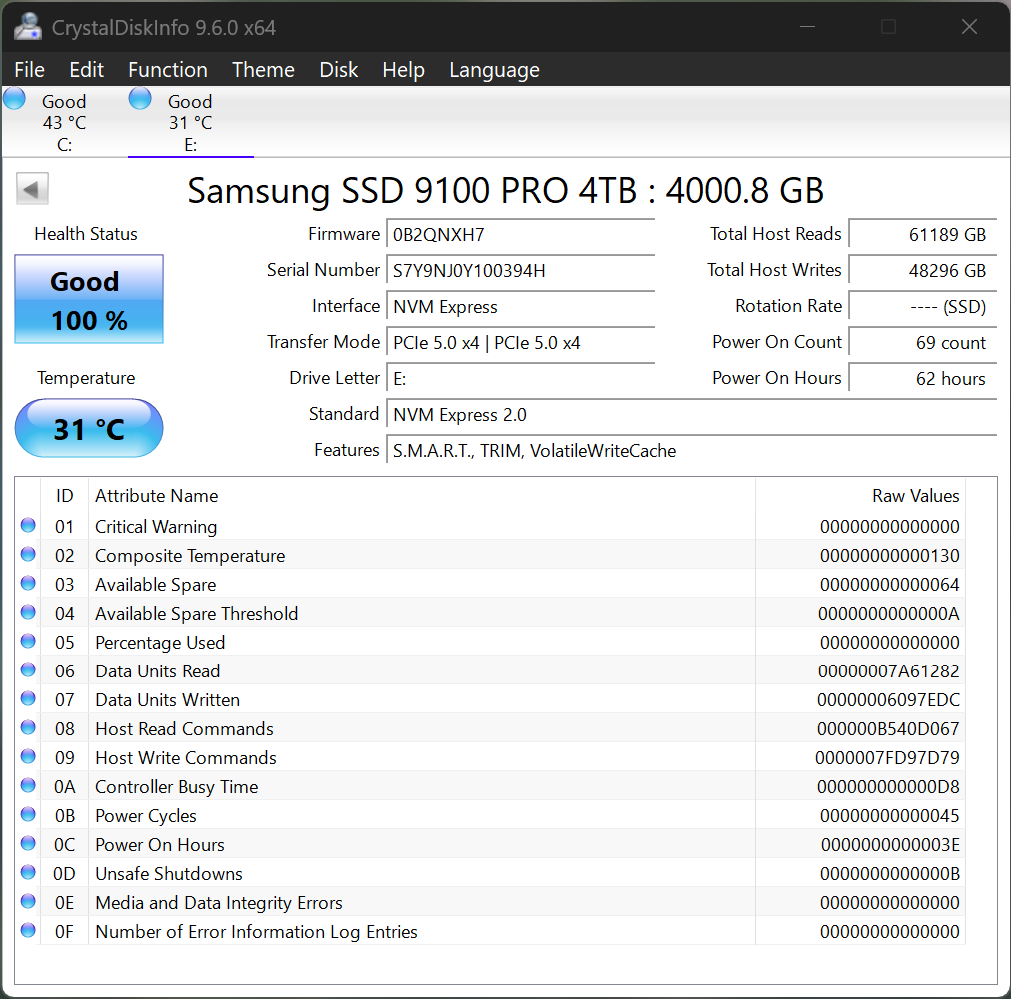
The Samsung 9100 Pro utilizes NVM Express 2.0 and has a feature set of SMART, TRIM and VolatileWriteCache. Of little importance to many but worth mention is that VolatileWriteCache means that a successful write operation has been reported once the data has reached the drives internal cache memory. Take a look at the amount of testing we have put into this Gen 5 SSD – 48TBW!
ATTO Disk Benchmark is perhaps one of the oldest benchmarks going and is definitely the main staple for manufacturer performance specifications. ATTO uses RAW or compressible data and, for our benchmarks, we use a set length of 256mb and test both the read and write performance of various transfer sizes ranging from 0.5 to 8192kb. Manufacturers prefer this method of testing as it deals with raw (compressible) data rather than random (includes incompressible data) which, although more realistic, results in lower performance results.
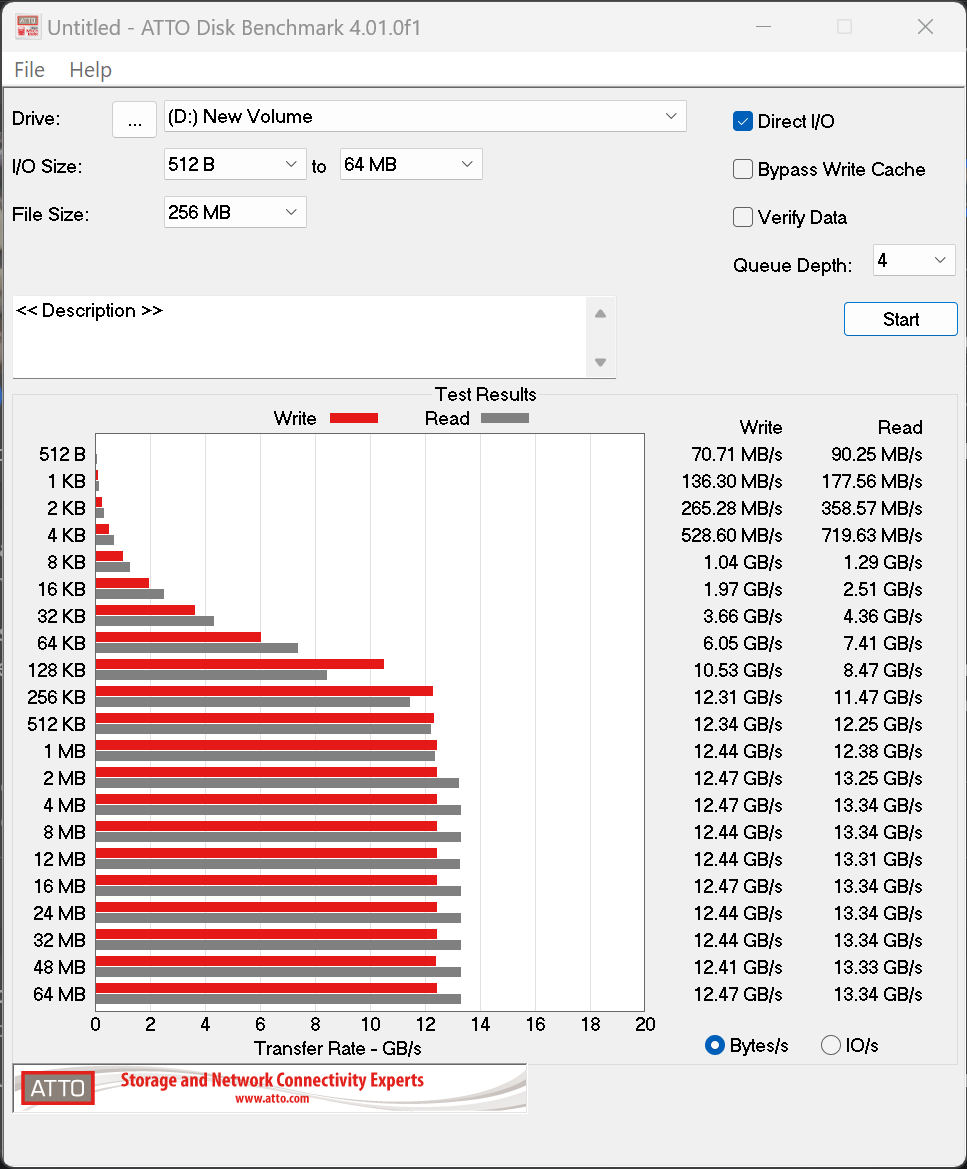
The Samsung 9100 Pro Gen5 SSD reaches ATTO speeds of 13.34GB/s read and 12.47GB/s write which is excellent. As well, we have always found the sign of a solid SSD to be gradual and steady performance increase as data sample sizes increase…just as shown above.
Hi Les, Thanks for the review. Quick question if you dont mind…Did you test the 9100 pro in the PCIe 5×4 m.2 slot or did you test it with a PCIe adapter in one of the PCIe 5 slots?
The drive was tested in the former Z790 Gen HyperSSD AIC and not the M2 slot. Current Gen motherboards do not allow full performance from 14GB/s SSDs and we may be writing an article on this in a week or so… Waiting for a return from Intel. Presently, 14GB/s ssds only achieve 12GB/s speeds in the M2 slot and we have confirmed this in a number of different boards and can also validated it from several other tests and Internet posts of other sites.
Thanks for the reply! That is what I am experiencing also. Extremely nice drive though.
Take a look at our report posted just today. Can you detail the motherboard and SSD you are using? ANything else that may habve been observed?
Hi Les,
Have you received any additional information regarding this issue with the Gen 5 M2 slot performance?
Report posted this morning. Can you detail the motherboard and SSD you are using? ANything else that may habve been observed?
Thanks for the review and the additional information on the slow speeds on z890 motherboards! I am getting nearly identical results that you are seeing, both the slow speeds in the m.2 slot, and the full speeds using a PCIe 5 to m.2 adapter. This is on an MSI PRO Z890-A WIFI motherboard using a Samsung 9100 Pro ssd. MSI has not yet acknowledged that this is an issue. I have been providing information to Intel, but they have not provided any solutions.
@Les: Does the M.2 slot vs PCIe differences of PCIe 5 cards capable of over 12,000 GB/s also impact TRX50 and WRX50 (AMD Threadripper) motherboards?
Also for Intel Optane Memory p5800x 1.6TB SSD users such as myself, do you recommend I still use it as a boot drive vs. these PCie 5 cards? If so, what you anticipate NAND SSDs need to be more capable of with PCie 5/6 to dethrone such SSDs for such purposes?
I’m about to create a new Threadripper 9000 rig and was curious
* Note I’m aware of the WD_Black SN8100 Gen5 SSD review that beat the p5800x in a particular benchmark; just felt it was more appropriate to ask here re: the differences using Gen 5 SSDs in M.2 slots vs PCie SSD AIC cards
I don’t use M.2 slots. I use the ASUS Hyper card when testing SSDs to ensure full performance.
The 12GB/s limitation in M.2 slots is limited to Intel 200 series boards alone. With respect to the P5800x continuing as your boot drive, it is really a matter of personal preference when you compare the speed of SSDs today. Modern SSDs have surpassed Optane performance in all but one area… low random 4K read performance which still sits at over 400MB/s. You are still 3x on load times compared to non-Optane users.
Understood; thanks for taking the time well after this review to provide additional nuance and context with your experience with your PCIe 5 Gen SSDs.
Continue the great work!
Just to make sure: My 1.6TB Optane P5800x is still 3x faster on load times compared to non-Optane users to your estimation or slower?
Your Optane has low random reads above 400MB/s which has never been achieved by any other SSD, consumer, client or enterprise. That’s your answer to right there.