 The SSD Review The Worlds Dedicated SSD Education and Review Resource |
Truth be told, this is not the fault of motherboard manufacturers, nor is it that of SSD makers. It is an issue with Intel Ultra Series 200 CPU’s that some might believe would have been picked up through initial Z890 motherboard reviews. Our testing has identified two concerns with these motherboards.
The first becomes evident when one tests a PCIe 5.0 14GB/s capable SSD in the M .2 slots of Ultra 200 Series motherboards. We have consistently received substandard results of 12GB/s sequential read data throughput in our Z890 motherboards, and have had peers test the same scenario and obtain the same results. We have also found countless published reports where the same issue is in print, always with a Gen5 14GB/s capable SSD within a Z890 motherboard. In fact, we have been unable to confirm ANY Z890 motherboard Gen 5 M.2 slots providing a result of 14GB/s sequential read from a Gen5 SSD.

But let’s not stop there… We also recognize that, regardless if SSDs are being read from the Z890 M.2 slot or via an AIC that has the Gen5 M.2 Slot on board, random write performance is also substandard to what we have seen in our Z790 Test Bench.
We reached out to ASUS and ASRock who both confirmed their ability to reproduce our results. Both explained that this difference is the result of a higher latency of the Intel Core Ultra 200 Series CPU IOE Tile (I/O Extender) which feeds the Gen 5 M.2 slots, then the SoC (System-on-Chip) Tile which feeds the Gen5 PCIe lanes. This is rather amusing as new Ultra series CPUs are the first to utilize a multi-die configuration and this eliminates those oh-so frustrating bifurcation issues of previous generation CPUs. One things for sure… the PC community is still experiencing too many peripherals with too few lanes.
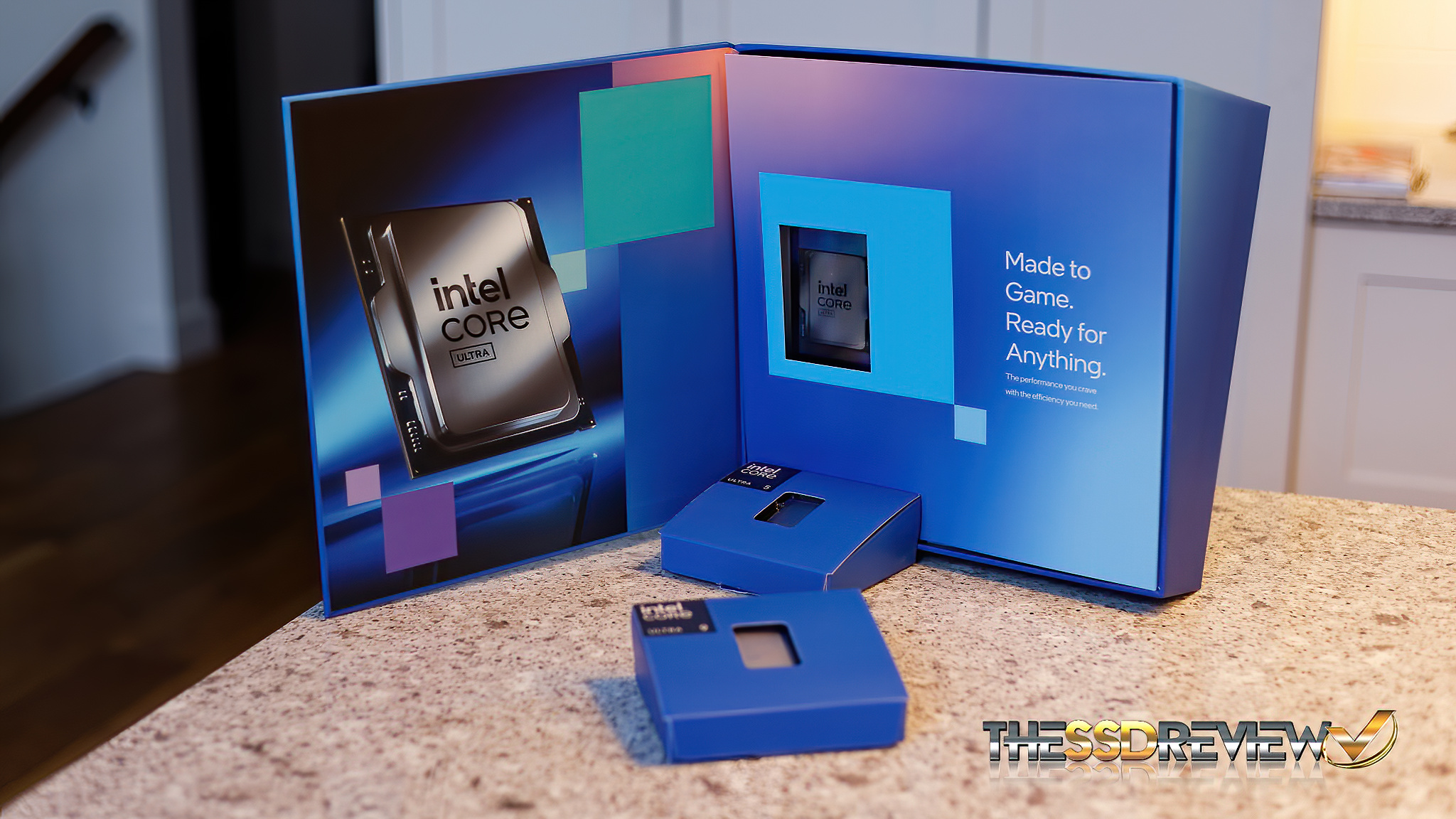
We then approached Intel who responded as such, confirming what the motherboard manufacturers had related but in a more generic language:
Intel can confirm that the PCIe Lanes 21 to 24 Gen5 root port on Intel Core Ultra 200S series processors may exhibit increased latencies compared to the PCIe Lanes 1 to 16 Gen5 root ports, owing to a longer die-to-die data path. However, any variations are contingent upon the specific workload and the capabilities of the PCIe endpoint device.
Z890 VS Z790 TESTING OF M.2 SLOT PERFORMANCE
For our demonstration, we have two Z890 motherboards and one Z790 motherboard on hand and we used two Gen5 14GB/s SSDs; the Samsung 9100 and Micron 4600. Crystal DiskMark is the benchmark we chose for this report to identify the discrepencies but we can relate that the performance difference is evident in all of our benchmarks.
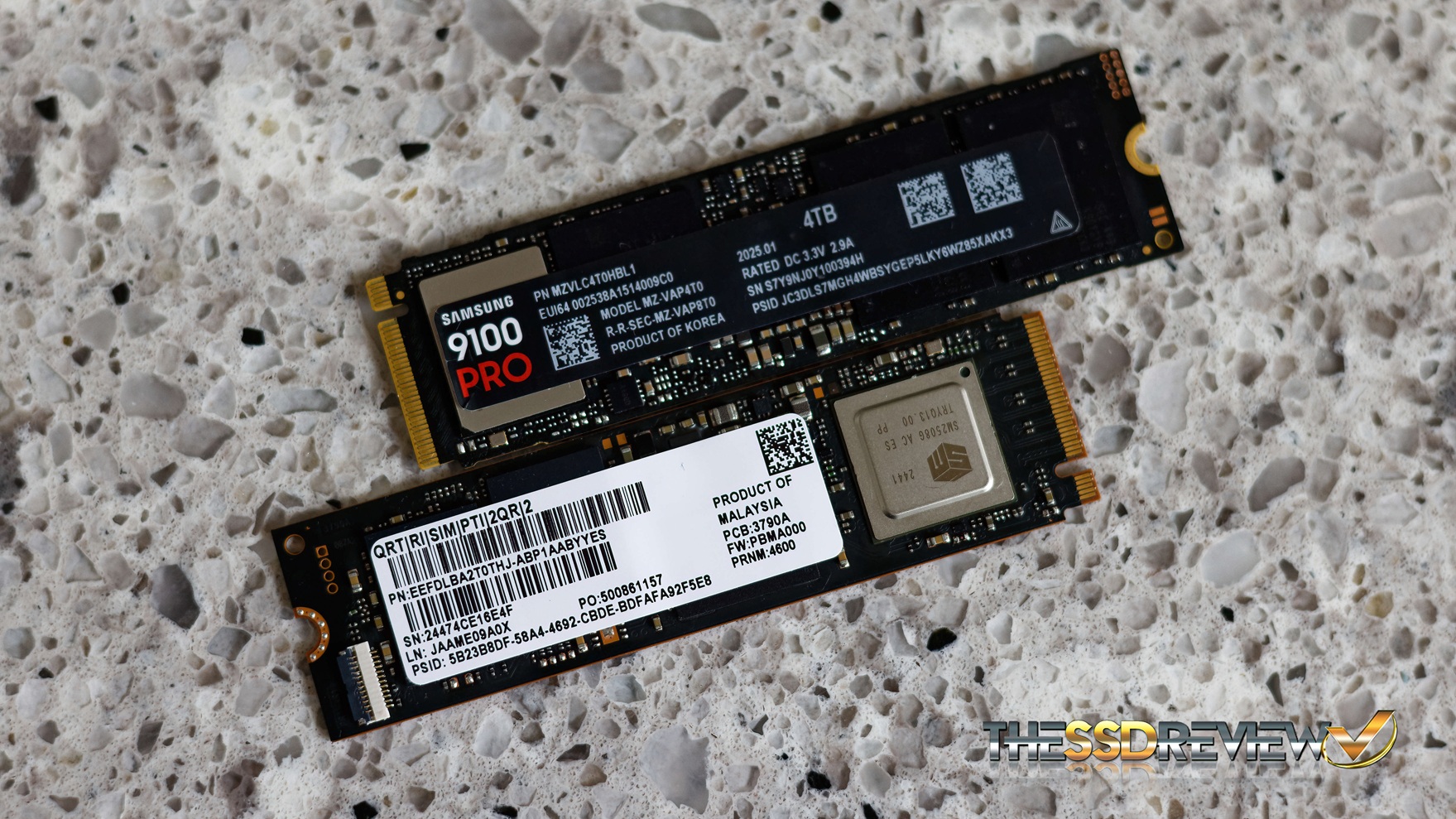
TESTING GEN5 14GB/S SSDS IN Z790 MOTHERBOARD M.2 SLOT
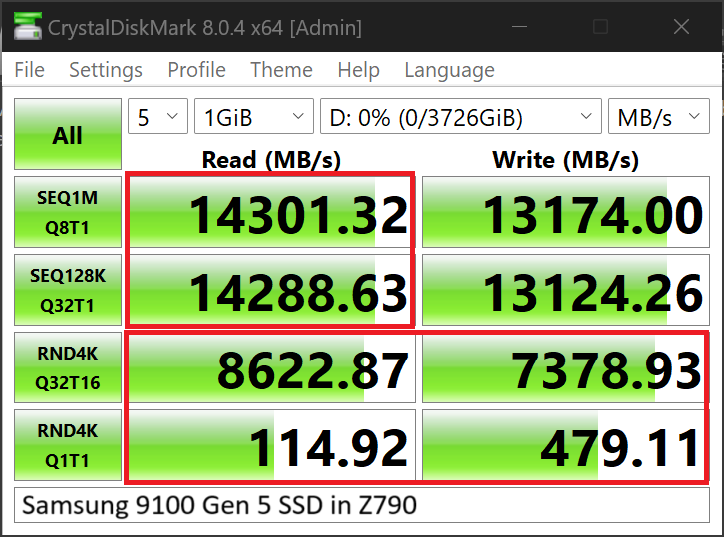
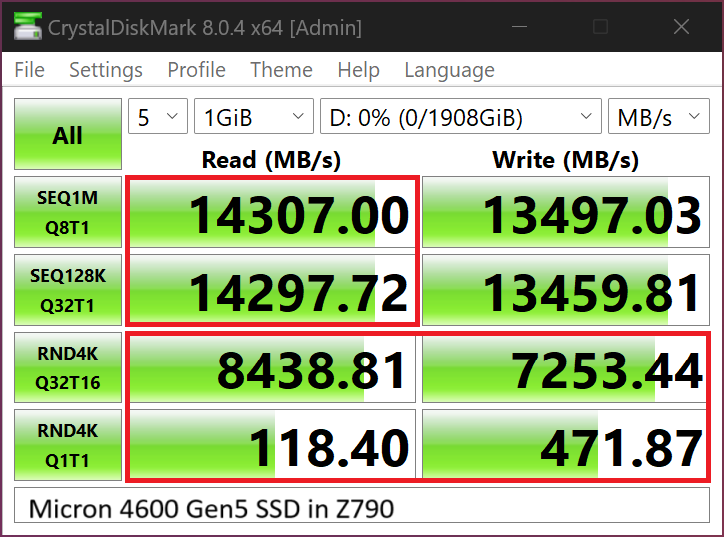
There is absolutely nothing wrong with these results as we continue to pull them from our Z790 Test Bench and having been doing so for some time. All tests were completed this morning.
TESTING GEN5 14GB/S SSDS IN Z890 MOTHERBOARD #1 M.2 SLOT
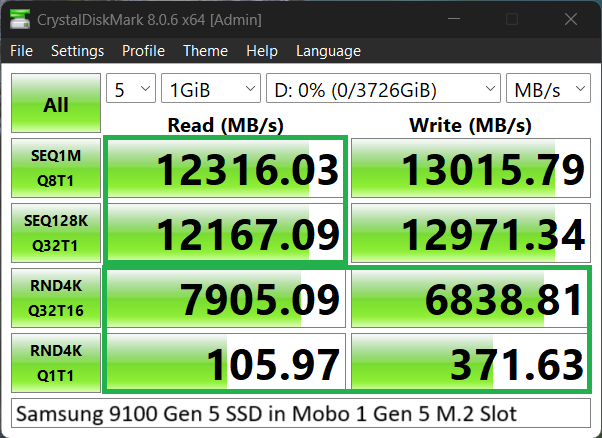
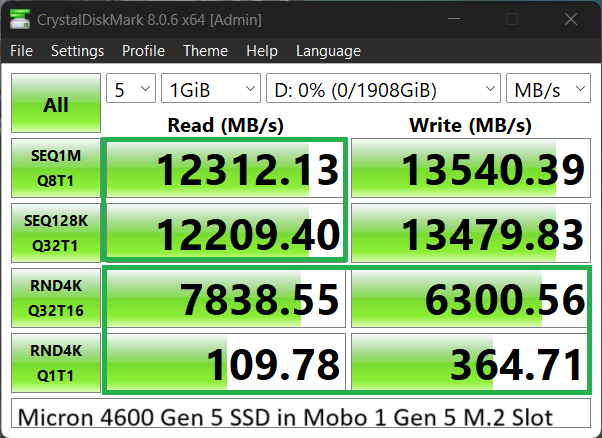
These tests demonstrate the results of our testing our 14GB/s Gen 5 SSDs with Crystal DiskMark in the Gen 5 M.2 slot of our first sample Z890 motherboard. In all cases, the sequential read speeds have dropped from 14GB/s to 12GB/s, and also, random read and write performance has dropped in all as well.
TESTING GEN5 14GB/S SSDS IN Z890 MOTHERBOARD #2 M.2 SLOT
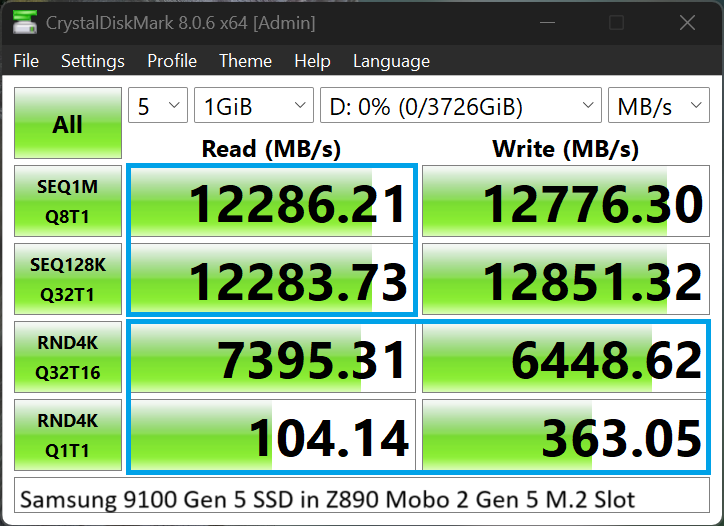
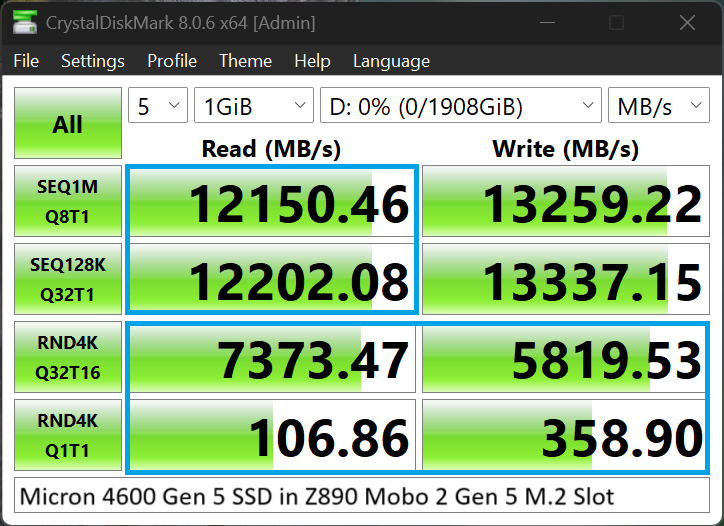
Confirmation of what we had seen in the results from the first Z890 motherboard can be seen in these above results in the second Z890 motherboard.
TESTING GEN5 14GB/s SSDs FROM THE Z890 PCIe 5.0 LANE
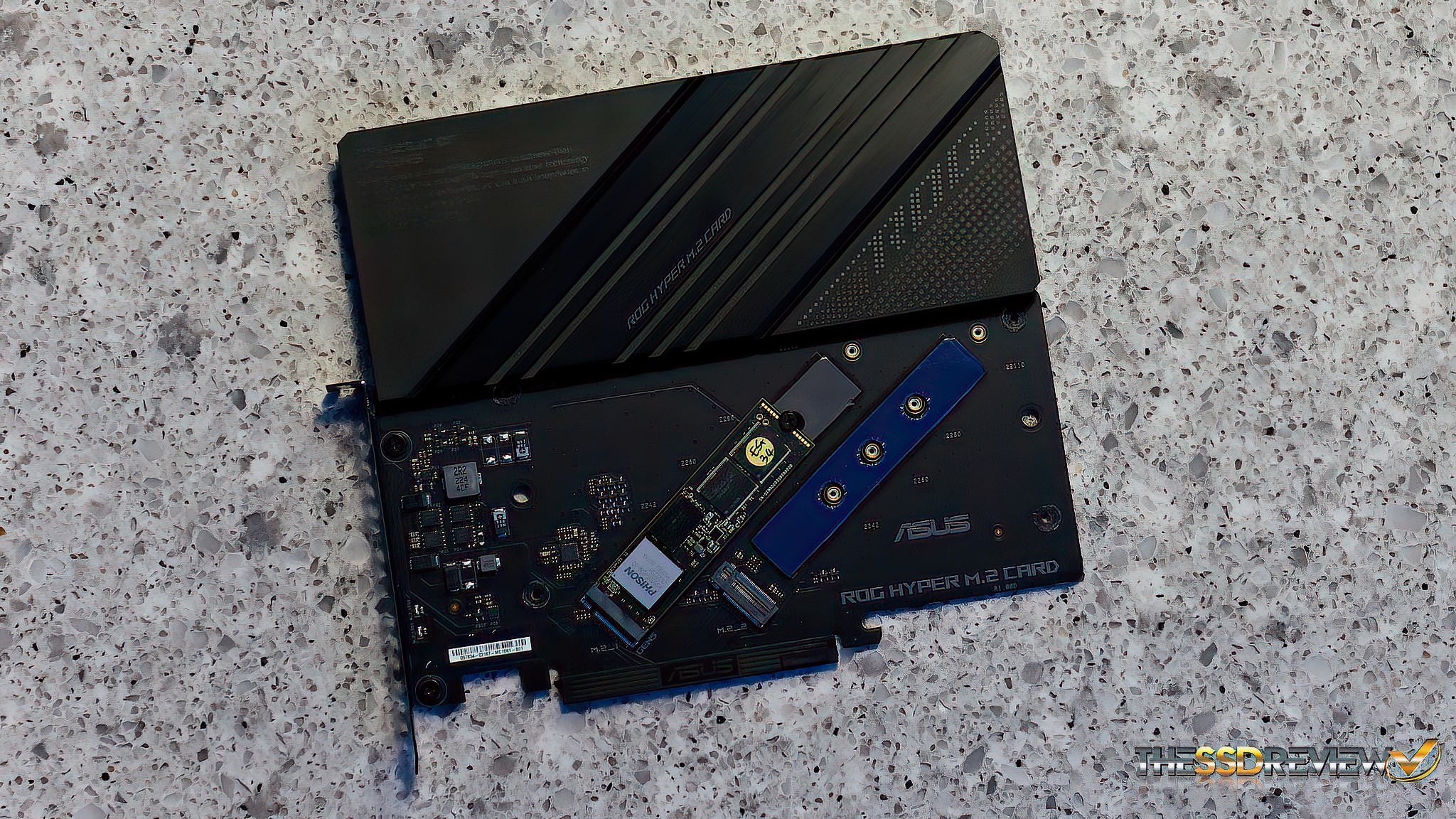
In order to validate that the issue was strictly with Gen 5 motherboard M.2 slots, we used the ASUS Hyper M.2 Card plugged directly into the motherboards PCIe 5.0 lane of both Z890 motherboards and both displayed similar results as this:
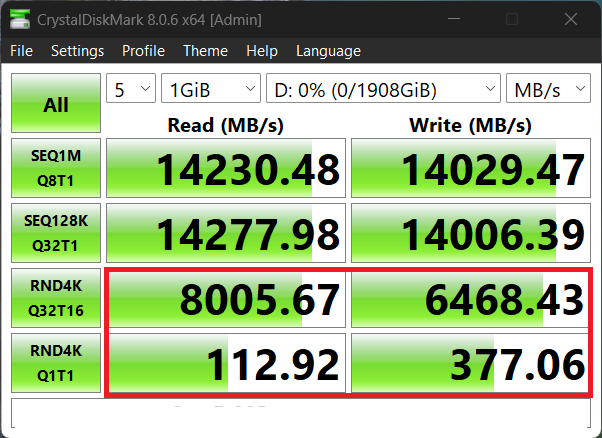
While we see the strongest read and write sequential performance to date in an SSD, the lower random read and write performance is still lagging behind those original tests of the Gen 5 SSDs tested in our Z790 Test bench, as shown in the first samples above. This is typical of all three SSDs in either sample Z890 motherboard.
SUMMARY AND FINAL THOUGHTS
We can’t speak for every Intel Core Ultra 200 Series motherboard with respect to this issue but we have tested this along with having industry peers demonstrate same. Intel and motherboard manufacturers have also been able to duplicate our concerns and, finally, there are plenty of examples posted on the internet that demonstrate these exact results. If you can get Z790 results as we have demonstrated from your Z890 Gen 5 M.2 slot, please comment or write us. If you are a Core Ultra 200 Series motherboard manufacturer and this does not occur with your motherboard, send it along as we desperately need it for our Test Bench.
It is actually a bit amusing because any reader looking at any of the above Crystal DiskMark results would be ecstatic moving up from a Gen 4 system. As a storage reviewer, things are a bit different though. We have to squeeze every bit of performance from an SSD for our reports and 12GB/s simply won’t do. We know manufacturers wouldn’t accept this in our reports. We have had several readers contact us for just this problem. At this point, we wonder how many enthusiasts have returned Gen 5 SSDs capable of getting 14GB/s simply because it would not reach those speeds in their new Intel Core Ultra 200 Series motherboard.
We have not received word from Intel that this would be the subject of a firmware update in the near future and it is not affected by Intels latest update as of 6 May 2025.
Thanks for this information. I am experiencing nearly identical results that you are seeing, both the slow speeds in the m.2 slot, and the full speeds using a PCIe 5 to m.2 adapter. This is on an MSI PRO Z890-A WIFI motherboard using a Samsung 9100 Pro ssd. MSI has not yet acknowledged that this is an issue. I have been providing information to Intel, but they have not provided any solutions.
Intel has acknowledged the reasoning. This issue is global IMO. There are countless examples.
One question…Has Asus or Intel mentioned anything that suggests that this could be a motherboard issue? I may have misunderstood, but the responses from Asus and Intel seem to indicate that this is more of a CPU issue with 200s series processors rather than a Z890 issue, per se.
They have stated its a Ultra 200 Series issue as I posted. All motherboards will have the same results.
While this is CPU issue, but tests should be performed on these faulty m2 slots, as almost all users will attach their SSD to that slot. Users want to know if there is more performance problems, than limited sequential speed. Could be great to include also AMD platform as it is becoming increasingly popular, but there may be some quirks compared to Intel platform, that affect performance.
Intel, Asus and ASRock have already duplicated and confirmed that this issue lies with the Core Ultra 200 Series CPUs and not the M.2 hardware. Would love to have an AMD system on board but we are simply a small mom and pop organization that simply squeaks by. AMD = Higher sequential read and writes. Intel = Better low random read and writes.
Same problem on Asus Nuc 15 Pro+. PCIE Gen 5 slot, but speeds are bouncing up and down.
What started at 14,00 read went down to 4,000 and then up and down without reason. Samsumg Tech supported reported Intel had an issue with Core Ultra 9 285h.
If you started at 14GB/s that would be a first but probably understandable considering it is the NUC and doesn’t have full size PCIe lanes. I actually jus posted an article on the ProGrade 4TB SSD where it dropped before leveling out. I attribute such to the interface. Thanks much for commenting.
Hey, I am also seem to be getting this problem on AMD with a b650 motherboard and 7800x3d.
I made a post on asus forums
https://rog-forum.asus.com/t5/amd-600-series/asus-rog-b650a-slow-random-speeds-on-m-2-1-slot/td-p/1095366
Confirmed on 265K with 9100 Pro 4TB :(. 12.5GB/s max observed down from quoted 14.8GB/s max.
This needs to be more widely distributed and covered
Thanks and we agree totally! Share!
Gigabyte confirmed your observations on their Z890 motherboards and redirected me to Intel:
“Our Z890 board shows the result as the website (tested with Samsung 9100 Pro). Suggest check directly with Intel for this issue.”
yes this is a chipset issue that will live with this release I am afraid. I had included Intel’s response in the article. Thanks for writing.
Some month later the same problem with an ASRock Z890 PRO RS and WD 8100 2TB. The Write Speed is ok and the Read Spee is aprox. 12.300 Mbit/s.
Yes this is not a curable ailment I am afraid. Sorry.
You can add me to it. Z890 Tomahawk. Just replaced the 4tb 990 pro with a 4tb 9100 pro. M2 CPU NVME
Sequential read and write went up almost double. RANDOM read and write, at best, stayed the same or slightly lower. All settings correct.
All firmware and drivers newest.
Put them (a 2TB and a 4tb) in a Sabrent M.2 adapter to PCIE x16 gen 5. Random read write is now closer to what it should be. At least bearable.
Z890 or intel has an issue. I ate the last CPU build on junk Intel that were all bad. I put it in the backroom with bios that throttles it.
I guess I have to think about dumping Intel. FYI: I build and program Core platforms for a large ATM company.
There is a new 290K series chipset on the Horizon and we are hoping to get one in hand to validate that this has cured the problem. Thank you for the comment.